Branches (establishments, factories or other secondary sites that belong to a company) now have their own space in Entities. Instead of looking for them among companies and their holdings, you can open the dedicated "Branches" menu and work with branches directly. This article explains where to find your branches and what you see for each one.
✅ What is a branch?
A branch is a secondary site that belongs to a larger organization, such as an establishment or a factory. A branch is always attached to a parent company and is not a stand-alone legal entity. Because a branch is not owned through shares, capital information such as ownership percentages does not apply to it.
⭐ Open the Branches menu
- Log in to Entities.
- In the main menu on the left, click "Branches". It is just below "Companies".
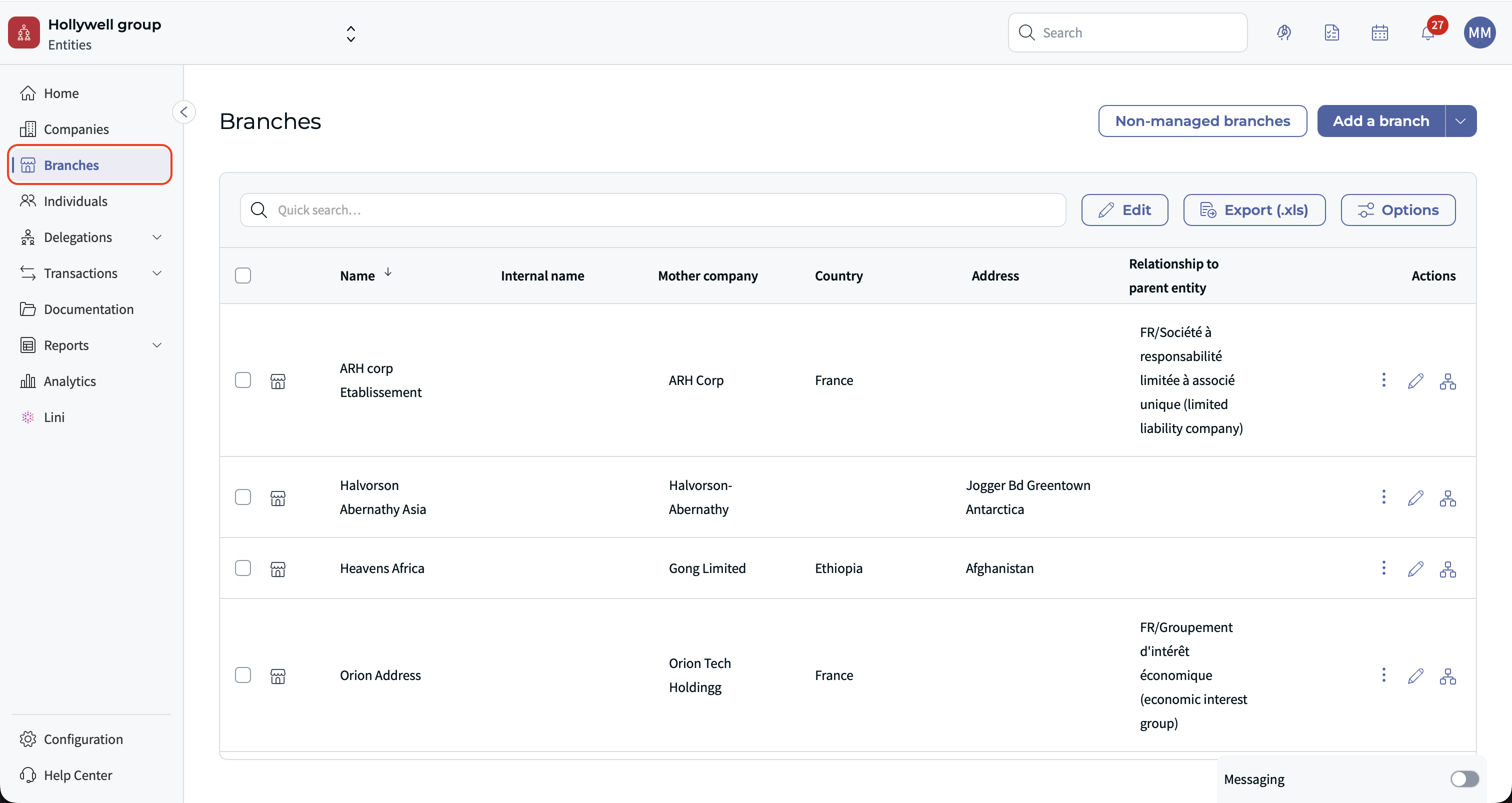
- The Branches page opens and lists your branches, separately from your companies and their holdings.
You can sort and filter the list of branches to find the ones you need.
✍ What you see for a branch
A branch page only shows the information that matters for a branch, for example:
- Its address
- Its registration details
- Its country
- Its parent company
Capital-related information, such as ownership percentages, is not displayed for branches. Branches do not use the "Legal form" field: the link between a branch and its company is described in the "Relationship to parent company" field instead.
⛪ Branches in the company overview
When you open a company, its branches are displayed in their own section of the company overview, separate from the companies it owns (its holdings). No ownership percentage is shown for branches.
⚡ Branches in the org chart
In the org chart, a branch is connected to its parent company with a specific link, positioned next to the company's box. No percentage is displayed on this link, because a branch is attached to its company rather than owned through shares.
✅ Follow all branches at once
You can follow all the branches of a company in a single action, instead of following each branch one by one. Once you follow a branch, you receive email alerts for its transactions.
⚖️ Branch directors
The branch director is managed only from the branch record. The "Directeur de succursale" role is no longer offered when you add an internal mandate to the parent company. This avoids recording the same information in two places.
❓ FAQ
Why don't my branches appear with the companies a company owns anymore?
Branches are not owned through capital, so they are listed separately from holdings. Find them in the "Branches" menu and in their own section of the company overview.
Why is there no percentage between a branch and its company?
A branch is attached to its company, not owned through shares. That is why no percentage is shown in the company overview or in the org chart.
Why can't I select a legal form for a branch?
Branches do not use the "Legal form" field. Use the "Relationship to parent company" field to describe how the branch is attached to its company.
Where do I record a branch director?
On the branch record only. It can no longer be added as an internal mandate of the parent company.
Was this article helpful?
That’s Great!
Thank you for your feedback
Sorry! We couldn't be helpful
Thank you for your feedback
Feedback sent
We appreciate your effort and will try to fix the article