Legal teams often keep company documents in different places, so finding a specific answer means opening and reading long documents and sharing them across head office and local teams. For the General Counsel, this makes saving time on daily searches a priority.
Lini is the AI assistant built into DiliTrust. In Legal Entity Management (LEM), Lini answers your questions about your entity data, creates files for you and prepares updates for you to confirm. This article shows, role by role, what you can ask Lini and what you get back.
To learn everything Lini can do in LEM and how it works, see LEM – Lini: Capabilities and Features.
✅ Before You Start
- Lini must be enabled for your organization. If you don't see LINI in the main menu of LEM, contact your DiliTrust administrator.
- You must have access to the Legal Entity Management (LEM) module.
- Your entity data must be filled in LEM. Lini answers from the data recorded in LEM. It never invents a missing value.
- Lini only uses the data you are allowed to see. It follows your existing access rights.
How to ask Lini a question
- Open the Legal Entity Management (LEM) module.
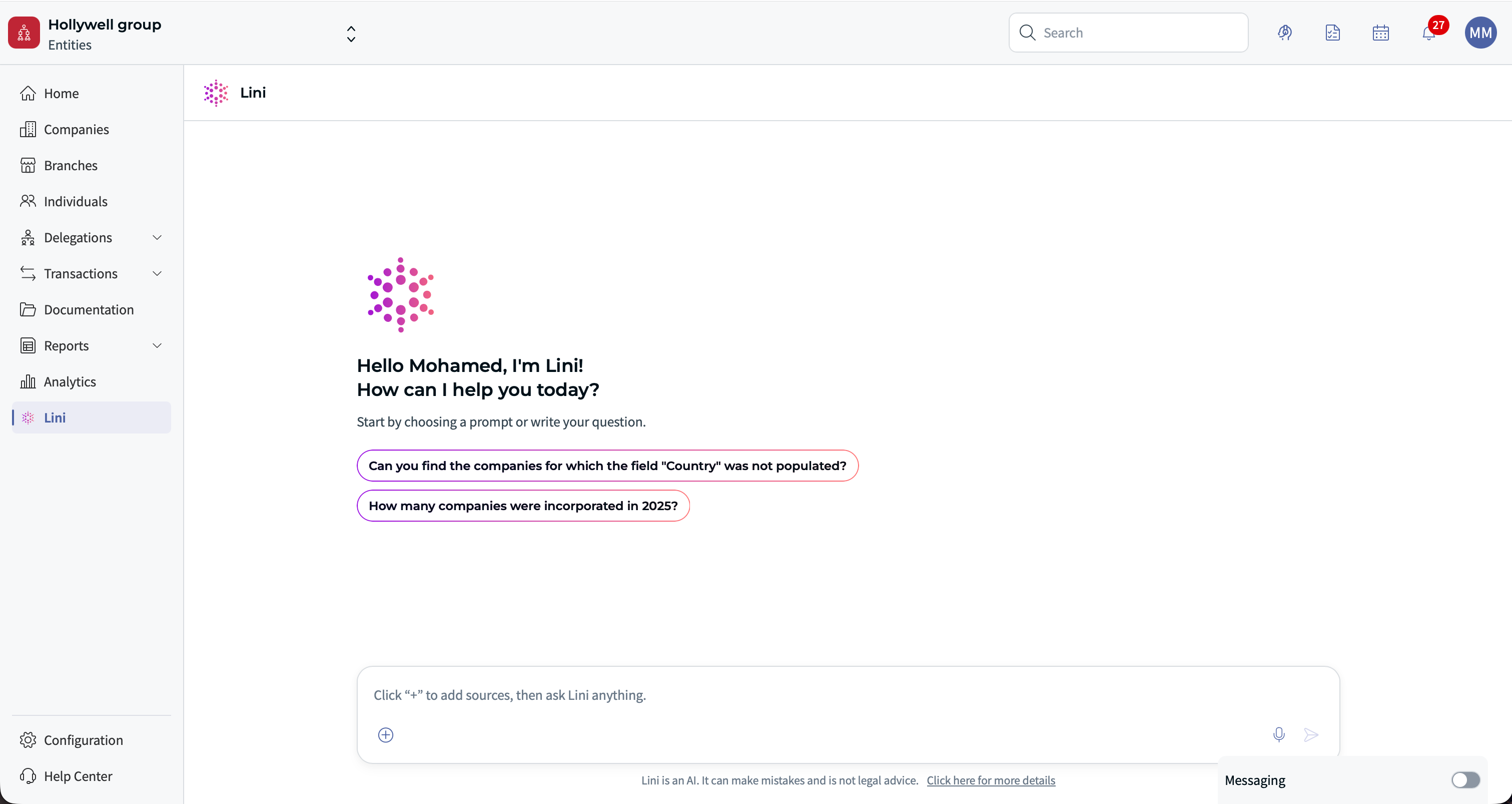
- In the main menu, click LINI. The assistant opens in full screen.
- Pick a suggested prompt, or type your own question.
- To point Lini to one specific record, type @ in the chat input. Choose a category (company, individual or mandate), then select the record. It is added to your question as a tag, for example @Nova Technologies.
- Read the answer. To check where it comes from, click See source.
What you get back
Each example below tells you what to expect:
- An answer in the chat: text or a table, right in the conversation.
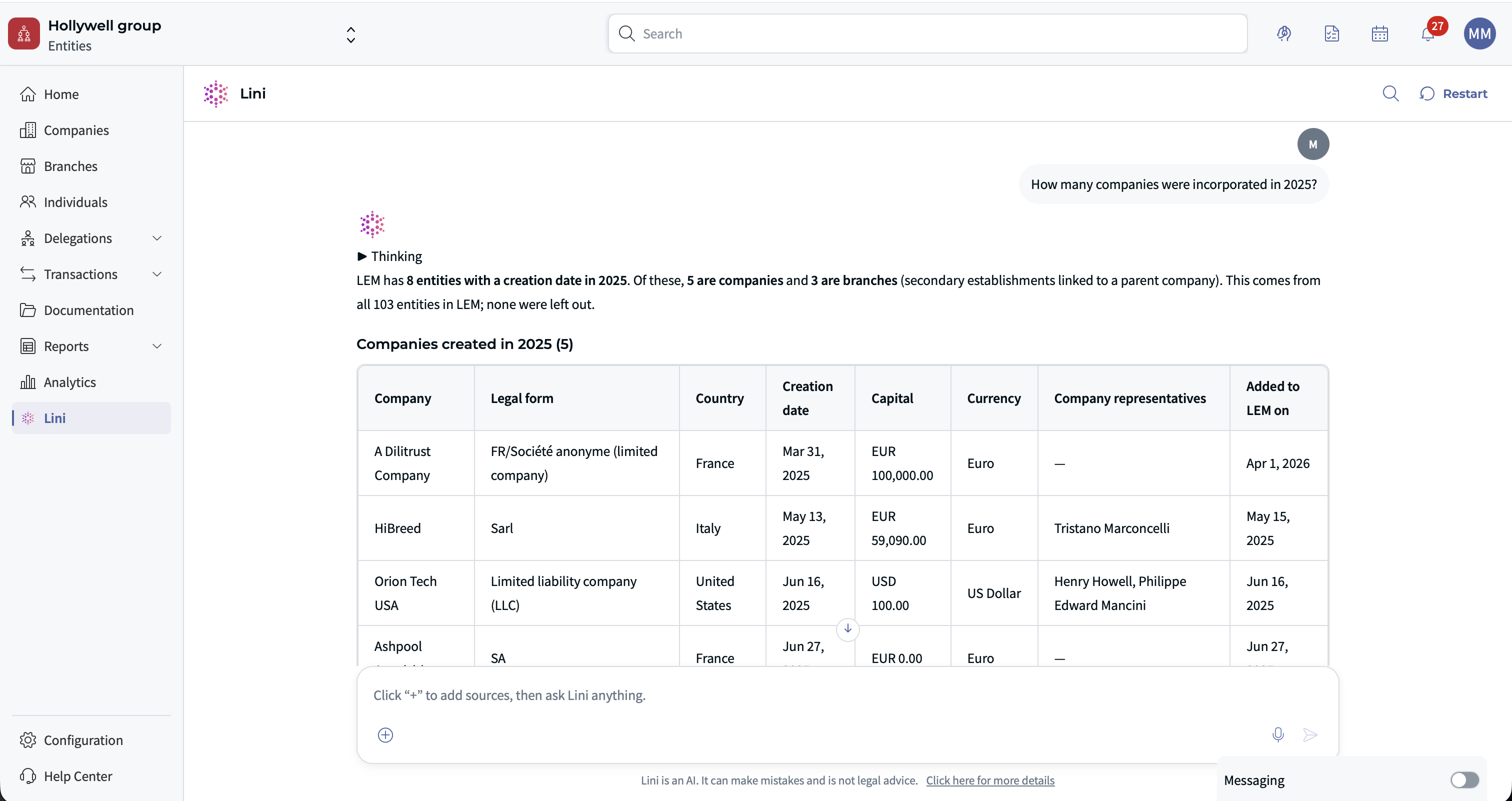
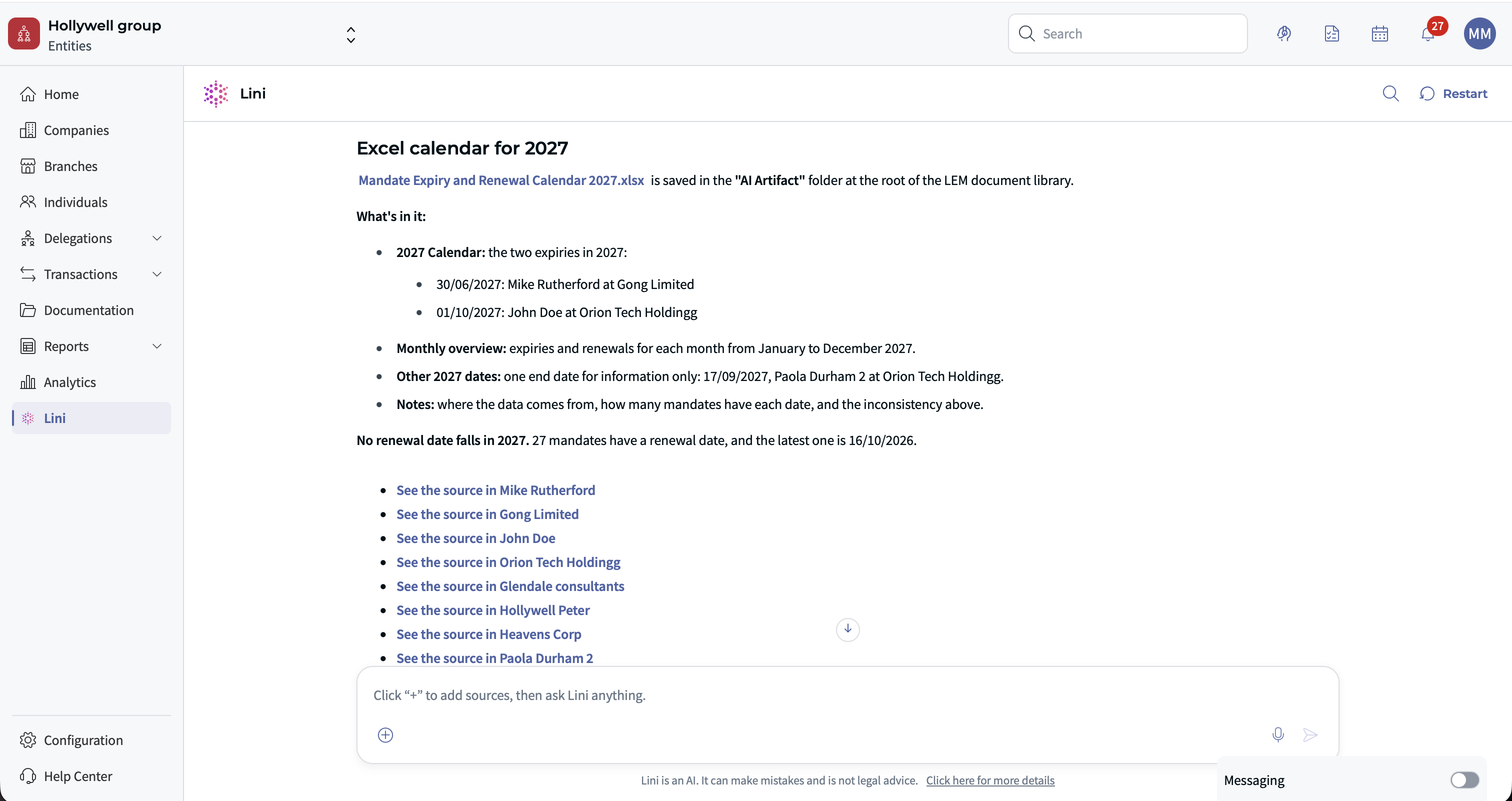
- A file: Word, PDF, Excel or PowerPoint. Files are saved in the "AI Artifact" folder of your workspace.
- Changes to confirm: Lini prepares the updates and lists them at the end of its answer. Nothing changes in LEM until you confirm in your next message.
- Legal research: answers based on published law, with verified citations. This is information, not legal advice.
⚖️ Use Cases for Corporate Secretaries
You run the governance calendar (board meetings, general meetings, renewals) and keep appointments up to date, often against strict deadlines.
See which mandates expire soon
Mandate end dates are spread across many companies, so a deadline is easy to miss.
Try asking:
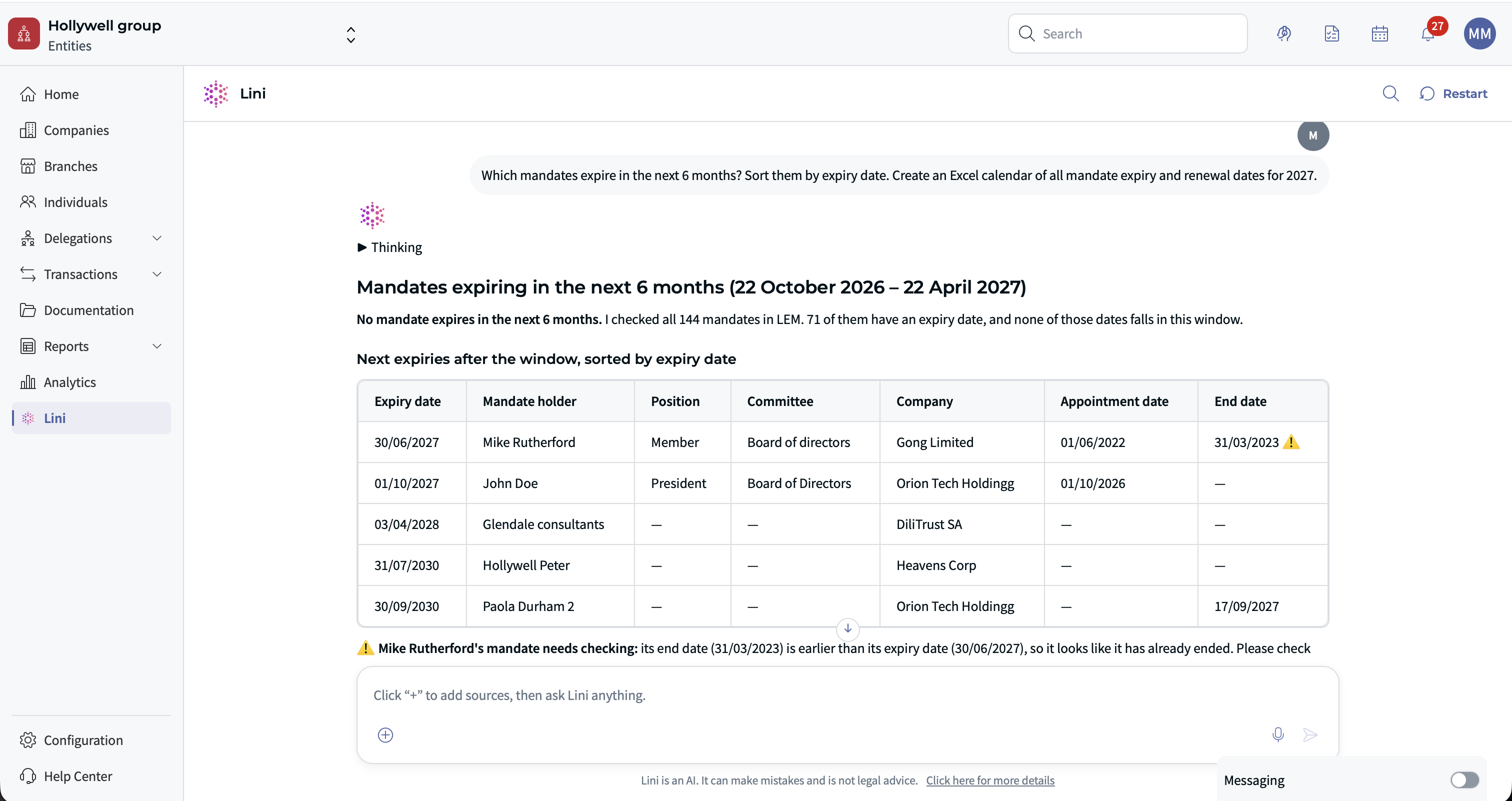
- “Which mandates expire in the next 6 months? Sort them by expiry date.” You get: an answer in the chat, or an Excel tracker.
- “Create an Excel calendar of all mandate expiry and renewal dates for 2027.” You get: an Excel workbook.
Update LEM after a board meeting or general meeting
After a meeting, each decision must be copied into LEM by hand, one record at a time.
Try asking:
- “Here are the signed board minutes. Update LEM accordingly.” You get: a comparison with LEM, then a set of changes to confirm.
- “The general meeting of company X on June 15, 2026 renewed all directors for 3 years. Prepare the renewals.” You get: a set of changes to confirm.
- “Add a timeline event for the general meeting of company X held on June 15, 2026.” You get: a set of changes to confirm.
Record a resignation and a successor
When a director leaves, you must end one mandate and create another, with the right dates.
Try asking:
- “Jane Doe resigned from the board of company Y on September 30, 2026; John Smith replaces her.” You get: a set of changes to confirm: end of the mandate and appointment of the successor.
Set up a new committee
Try asking:
- “Create an audit committee in company X as of November 1, 2026 with these three members.” You get: a set of changes to confirm.
Check the history of a mandate
Try asking:
- “Show the renewal history of the Chair's mandate at company Z.” You get: an answer in the chat.
⭐ Use Cases for Group General Counsel
You are responsible for the legal health of the whole group. You report to the executive committee and the board, and you need a reliable overview quickly rather than raw data.
Present the group structure
Building an up-to-date group chart by hand takes time before each committee.
Try asking:
- “Create a PowerPoint showing our group structure with the ownership percentage of each subsidiary.” You get: a PowerPoint presentation.
- “Give me a one-page Word record of company X: information, board, shareholders, share capital.” You get: a Word document.
Spot governance gaps
Try asking:
- “Which active companies have no board of directors or no members in office?” You get: an answer in the chat with a table.
- “How many mandates expire this quarter, by company and by country?” You get: a summary table in the chat or in Excel.
- “List all boards in the group with their members and appointment dates.” You get: an Excel workbook.
- “In how many companies does our CEO hold a mandate, and which ones expire in 2027?” You get: an answer in the chat.
Check the law before a decision
Try asking:
- “Under French law, what is the maximum term of a director’s mandate in a société anonyme?” You get: legal research with verified citations.
✅ Use Cases for Legal Entity Managers
You are responsible for the quality and completeness of entity data in LEM. You handle entity creation, dormancy, liquidation and clean-up.
Find incomplete or outdated records
Missing fields and old records are hard to find when you manage many entities.
Try asking:
- “Which companies have not been updated for more than 90 days?” You get: an answer in the chat with a table.
- “List companies with no address, legal form or share capital.” You get: an Excel checklist.
- “Create a PDF data quality report for all entities in the Europe scope.” You get: a PDF document.
Clean up duplicates and fix data in bulk
Try asking:
- “Are there companies with very similar names that could be duplicates?” You get: an answer in the chat.
- “Merge "ACME SAS" into "Acme S.A.S.".” You get: a change to confirm.
- “Set Germany as the country for all companies with an address in Germany but no country.” You get: bulk changes to confirm.
Close a dormant entity
Try asking:
- “Company W was dissolved on August 31, 2026. Close the company and all its open mandates.” You get: a set of changes to confirm.
Find out who changed what
Try asking:
- “Who changed company X's address, and when?” You get: the audit trail and field history in the chat.
✍ Use Cases for Paralegals and Legal Assistants
You do most of the daily data entry in LEM, prepare documents and extracts for lawyers, and handle many small, repetitive requests.
Create records from a document
Typing the content of articles of association into LEM field by field is slow and error-prone.
Try asking:
- “Create the company described in these articles of association, with its board and first shareholders.” You get: a set of changes to confirm.
- “Create a register for the company registration extract of company X and attach this file.” You get: a set of changes to confirm.
- “Add Marie Dupont, born March 12, 1975, email marie.dupont@example.com.” You get: a change to confirm.
Record a share transfer
Try asking:
- “Record the transfer of 500 shares of company X from Holding A to Holding B as of October 1, 2026.” You get: a share capital transaction to confirm.
Answer quick requests from lawyers
Try asking:
- “Give me the current list of directors of company Y as a PDF.” You get: a PDF document.
- “Find the document that mentions the capital increase of company Z.” You get: search results and a summary.
- “Give me the bulk import template for mandates.” You get: an XLSX template.
⛹ Use Cases for Other Roles
Lini also supports other people who work with entity data. The examples below show what each role can ask.
Compliance Officer
Responsible for anti-money laundering, beneficial owners and regulatory controls. Needs evidence and traceability for auditors and regulators.
- Ultimate owners: “Who are the direct and indirect owners of company X, with percentages?” You get: an answer in the chat, or a Word note.
- Mandate concentration: “Which people hold more than 5 active mandates in the group?” You get: an answer in the chat with a table.
- Expired mandates still active: “Are there mandates whose expiry date has passed without being ended or renewed?” You get: an answer in the chat.
- Audit trail: “Show all changes made to companies and people over the last 30 days.” You get: an answer in the chat, or an Excel export.
- Regulatory research: “What are the beneficial ownership reporting obligations in Luxembourg?” You get: legal research with verified citations.
- Representatives of corporate directors: “For mandates held by companies, who are the individuals representing them?” You get: an answer in the chat.
- Evidence pack: “Create a PDF with the board, shareholders and field history of company Y for the auditors.” You get: a PDF document.
CFO / Group finance / Tax
Needs ownership data for consolidation, tax and treasury. Works mainly in Excel.
- Consolidation scope: “Give me an Excel file of all subsidiaries of Holding X with direct and indirect ownership percentages.” You get: an Excel workbook.
- Share capital history: “Show all share capital transactions of company Y since 2020.” You get: an answer in the chat, or Excel.
- Share capital by entity: “List the share capital and currency of each company, by country.” You get: an Excel workbook.
- Bank accounts: “Which bank accounts does company Z have?” You get: an answer in the chat.
- Shares and voting rights: “Compare the share capital and voting rights percentages of the shareholders of company X.” You get: an answer in the chat.
- Recording a capital increase: “Company X increased its share capital by issuing 10,000 new shares to Holding A on September 1, 2026.” You get: a share capital transaction to confirm.
- Share capital summary for management: “Create a PowerPoint summarizing the group's share capital and main shareholders.” You get: a PowerPoint presentation.
M&A / transactions lawyer
Leads acquisitions, disposals, mergers and restructurings. Needs fast due diligence and accurate before and after views.
- Due diligence pack: “Create a Word due diligence summary on company X: record, governance, shareholders, share capital transactions, registers.” You get: a Word document.
- Before and after structure: “Create slides showing the shareholding of company Y before and after the sale of 60% to buyer Z.” You get: a PowerPoint presentation.
- Closing updates: “At closing on December 1, 2026, transfer all shares of company Y to buyer Z and replace the board.” You get: a set of changes to confirm.
- Merger: “Company A absorbed company B on November 30, 2026. Prepare the updates.” You get: a set of changes to confirm.
- Change of control check: “Which subsidiaries does company Y own, directly or indirectly?” You get: an answer in the chat.
- Legal research: “What rules apply to cross-border mergers under EU and French law?” You get: legal research with verified citations.
HR / executive management
Manages arrivals, departures and role changes of executives who hold corporate mandates.
- An executive's mandates: “List all mandates held by Paul Martin, with their expiry dates.” You get: an answer in the chat, or a PDF.
- Departure: “Paul Martin leaves on December 31, 2026. End all his mandates and appoint Sophie Leroy as his successor.” You get: a set of changes to confirm.
- Arrival: “Appoint Sophie Leroy as director of these 4 subsidiaries from January 1, 2027 for 3 years.” You get: a set of changes to confirm.
- Record update: “Update Sophie Leroy's email and address.” You get: a change to confirm.
- Executive mandates report: “Create a Word report of the mandates held by all executive committee members.” You get: a Word document.
External counsel / auditor
Usually has read-only access and needs reliable extracts and evidence.
- Shareholder register: “Give me the shareholders of company X as a PDF.” You get: a PDF document.
- List of directors: “Export the current directors of all French entities to Excel.” You get: an Excel workbook.
- Evidence of changes: “Show the history of the share capital field of company Y.” You get: an answer in the chat.
- Document review: “Summarize this document and list the decisions it records.” You get: a summary with citations.
LEM administrator / Legal Operations
Configures LEM (fields, templates, saved views) and looks for consistency across teams.
- Field settings: “Which fields exist for mandates, and what are the allowed values for "Role"?” You get: an answer in the chat.
- Saved views: “List the saved views for companies.” You get: an answer in the chat.
- Register templates: “Which register and record templates are active? Deactivate the old one.” You get: an answer, then a change to confirm.
- Bulk field update: “Add the "APAC" scope to all companies located in Singapore and Japan.” You get: bulk changes to confirm.
- Usage statistics: “Give me the company statistics for the workspace.” You get: an answer in the chat.
- Data exports: “Export all companies in the "Active entities" view to XLSX.” You get: an XLSX export.
⏩ Quick Reference by Role
- Corporate Secretary: mandate deadlines; updates from signed minutes; renewals, resignations and new committees.
- Group General Counsel: group structure presentations; governance gaps; legal research with verified citations.
- Legal Entity Manager: data quality checks; duplicates and bulk fixes; closing entities; audit trail.
- Paralegal: records created from documents; share transfers; quick extracts.
- Compliance Officer: ultimate owners; expired mandates; evidence packs.
- CFO / Finance / Tax: consolidation scope; share capital history; capital increases.
- M&A lawyer: due diligence summaries; before and after structures; closing updates.
- HR / executive management: departures and arrivals of executives; mandate reports.
- External counsel / auditor: shareholder and director extracts; history of changes.
- LEM administrator: field settings; templates; bulk updates; exports.
✨ Tips for Better Requests
- Name the company, person or mandate. Even better, type @ to select the exact record.
- Give exact dates, for example “as of October 1, 2026”.
- Say what you want back: “a table”, “an Excel file”, “sorted by expiry date”.
- Start broad, then ask follow-up questions to narrow the answer.
- Read the full list of prepared changes before you confirm.
- Click See source to check important figures against the LEM record.
❌ Limitations
- Lini never changes your data on its own. Nothing is carried out until you confirm.
- If one change in a list fails, the changes after it are not carried out.
- Deletions are permanent.
- Lini is not a lawyer. Legal research gives information, not legal advice about your situation.
- Lini does not draft official corporate documents such as minutes, resolutions or delegations. It can produce reports, summaries and overviews.
- Delegations of authority, Litigation, Contracts and Tasks are not yet supported in the chat. Use the corresponding LEM modules.
- Listing shareholdings, shares and timelines through saved views does not currently work. Lini gets the same information another way.
❓ FAQ
Can Lini change my data without my approval?
No. Lini prepares the changes and lists them at the end of its answer. They are only carried out after you confirm in your next message.
Can Lini see data I don't have access to?
No. Lini works within your existing access rights. You only get answers about the companies, people and documents you are already allowed to see.
Is our data used to train the AI models?
No. Your data is not used to train the models, either by DiliTrust or by the model provider. It is not shared with other clients.
Where are the files Lini creates?
In the "AI Artifact" folder of your workspace.
Can we give Lini to some users only?
Not today. Lini is enabled for your whole platform. If your organization does not want to use Lini, it can be disabled for the whole organization on request. Contact your DiliTrust representative.
Do I have to check Lini's answers?
Yes. Lini supports your team but does not replace its review. Check important information with See source before you use it.
Do I have to use these exact requests?
No. They are examples. Write your question in your own words and adapt it to your entities.
Was this article helpful?
That’s Great!
Thank you for your feedback
Sorry! We couldn't be helpful
Thank you for your feedback
Feedback sent
We appreciate your effort and will try to fix the article