⭐ Introduction
⚠️ Restricted access — This feature is available exclusively to certain clients under a specific contractual agreement. If you believe you should have access and do not see it, contact your Customer Success Manager.
The Spend Management module brings the tracking of contractual commitments directly into DiliTrust CLM. It lets contract managers define budget envelopes, attach them to the relevant documents, monitor ordered and invoiced amounts against authorised ceilings in real time, be alerted before any overrun, and organise their views (columns and filters) — all without leaving the platform.
The feature answers a concrete contractual risk: unknowingly exceeding a negotiated threshold, an internal delegation of authority or a tender-triggering amount. It replaces manual spreadsheet tracking with commitment control anchored in the contract life cycle itself. It was rolled out progressively across three scopes, described below in their final version.
⚙️ Module overview
The module is built on two main objects:
- Budget — a financial envelope defined by a maximum amount, a currency and a list of linked documents.
- Expense — the orders and invoices attached to a document, provided by the DiliTrust APIs from the client's ERP, then aggregated at document, contract-bundle and budget level.
ℹ️ Expenses are attached to a document via its document identifier. An annex (which has no document identifier of its own) therefore cannot directly carry a budget or an expense: tracking happens at document level.
It comprises several scopes:
| Scope | |
|---|---|
| 1️⃣ Scope 1: Budget & spend management / control | Creating and configuring budgets (manually or automatically from the summary sheet), budget overview and its metrics, budget list, linking/removing documents (single and bulk, contract bundles included), viewing expenses per document and per budget, and the « Contract finance control » panel in the document view. |
| 2️⃣ Scope 2: Budget reminder / monitoring system | Budget alarm rules: automatic notification when a budget or expense metric crosses a defined threshold. |
| 3️⃣ Scope 3: Columns / filters or Analysis / Analytics | Column management (Budget and Expenses tables), advanced filters on a budget's detail page and on the Expenses views, and export from the budget detail and Expenses views. |
ℹ️ Availability:
Scope 1 is available.
The reminder system (Scope 2) and column / filter management (Scope 3) are rolling out progressively.
A consolidated export from the global Budgets page, the share / add-owner feature and automatic budget-from-attribute creation are coming soon.
0️⃣ Permissions and access
Budget and expense management relies on the existing budget permissions, configured by the administrator:
- Administrators, Editors and Contributors — can be granted read/write or read-only access to budgets and expenses (create, configure and modify budgets, link/remove documents and manage alarm rules when granted read/write).
- Validators and Readers — have no access to budgets and expenses.
Key points:
- There is no separate permission for alarm rules: they follow the same rights as budgets.
- Expenses are fed via the API and remain read-only for all profiles (they cannot be edited manually, regardless of read/write rights on budgets).
- A budget is visible to any user who has access to all the documents attached to it. If a budget contains documents the user cannot access, a banner indicates that some amounts are missing.
ℹ️ The feature itself remains subject to the restricted contractual access mentioned in the introduction. The activation modalities and the detail of authorised profiles will be specified soon.
In this article:
- 1️⃣ Scope 1: Budget & spend management / control
- ⭐ Accessing budgets
- ⭐ Creating a budget (manually)
- ⭐ The budget detail page (Budget overview)
- ⭐ Linking documents to a budget
- ⭐ Removing a document from a budget
- ⭐ Viewing expenses (Expenses)
- ⭐ Financial control from the contract (Contract finance control)
- ⭐ Automatic budget creation from the summary sheet
- ⚠️ Rules and special cases
- 2️⃣ Scope 2: Budget reminder / monitoring system
- 3️⃣ Scope 3: Columns / filters or Analysis / Analytics
- ⭐ Best practices
- ⚠️ Limitations and points of attention
- ❓ Frequently asked questions
1️⃣ Scope 1: Budget & spend management / control
Scope 1 is the core of the module. It covers a budget's entire life cycle, from creation through to expense tracking, as well as financial control directly from a contract.
⭐ Accessing budgets
A new Budgets entry is available in the main navigation of the Contract room. As long as no budget exists, the page shows an empty state inviting you to create one.
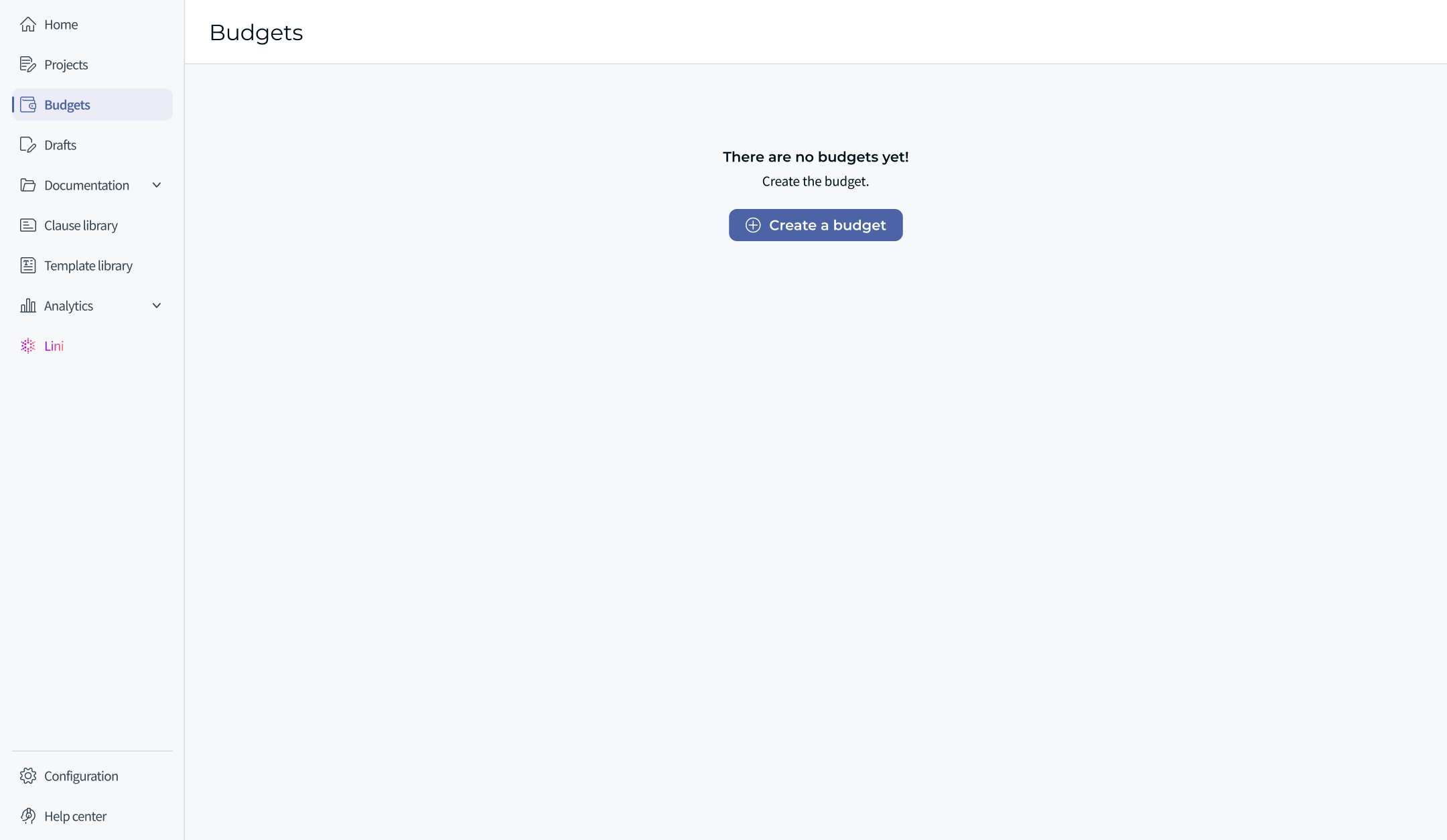
Figure 1 — The Budgets page in its initial state: « There are no budgets yet! » and the « Create a budget » button.
ℹ️ Visibility: any user with access to all the documents associated with a budget can see that budget. Depending on the case, a user may therefore land on an empty page (as above) or on a page already populated with the budgets they can access.
Once budgets exist, the Budgets page lists them in a table with the following columns: Name, Budget maximum, Remaining amount, Total amount invoiced, Linked documents (count + link), Budget ID and Actions. The Remaining amount can be negative when commitments exceed the maximum.
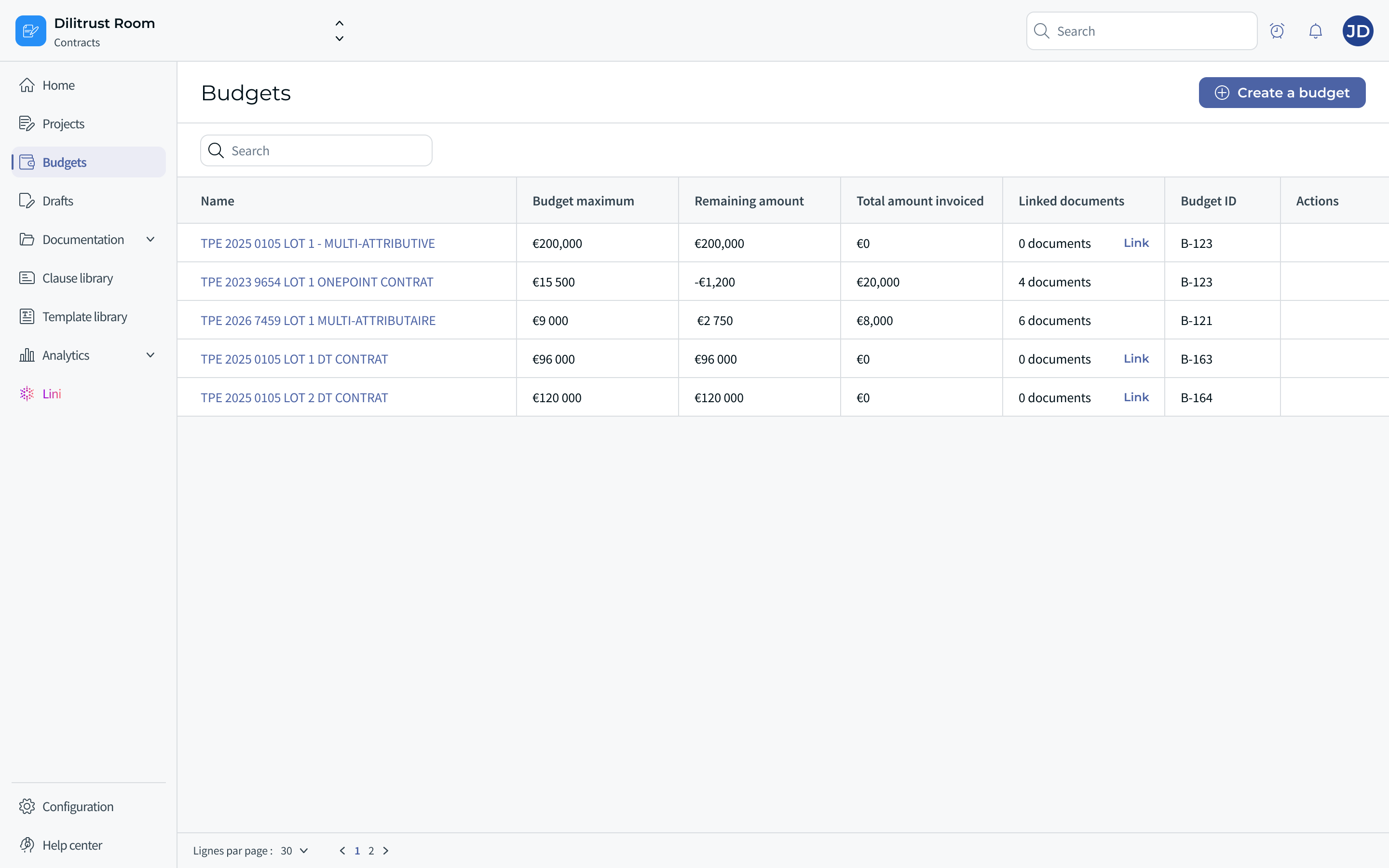
Figure 2 — The Budgets page populated with several budgets: Name, Budget maximum, Remaining amount, Total amount invoiced, Linked documents (count + Link), Budget ID and Actions.
⭐ Creating a budget (manually)
ℹ️ Recommended method. Manual creation is available for all budgets, but in practice it is mainly used for the envelope budgets of framework agreements (Accords-Cadres). For most documents, the recommended path is automatic creation from the summary sheet (see Automatic budget creation from the summary sheet), which limits input errors and encourages teams to complete their summary sheets.
Click Create a budget. A creation window opens. Fill in:
- Budget name (required) — the budget name.
- Budget maximum (required) — the maximum amount of the envelope.
- Currency (required, non-modifiable) — the budget currency. It cannot be changed after creation (see the warning below).
- Documents (optional) — you can link documents immediately or do it later.
Two confirmation actions are offered: Confirm (saves and redirects to the created budget's page) and Confirm and create another budget (saves then reopens a blank creation window).
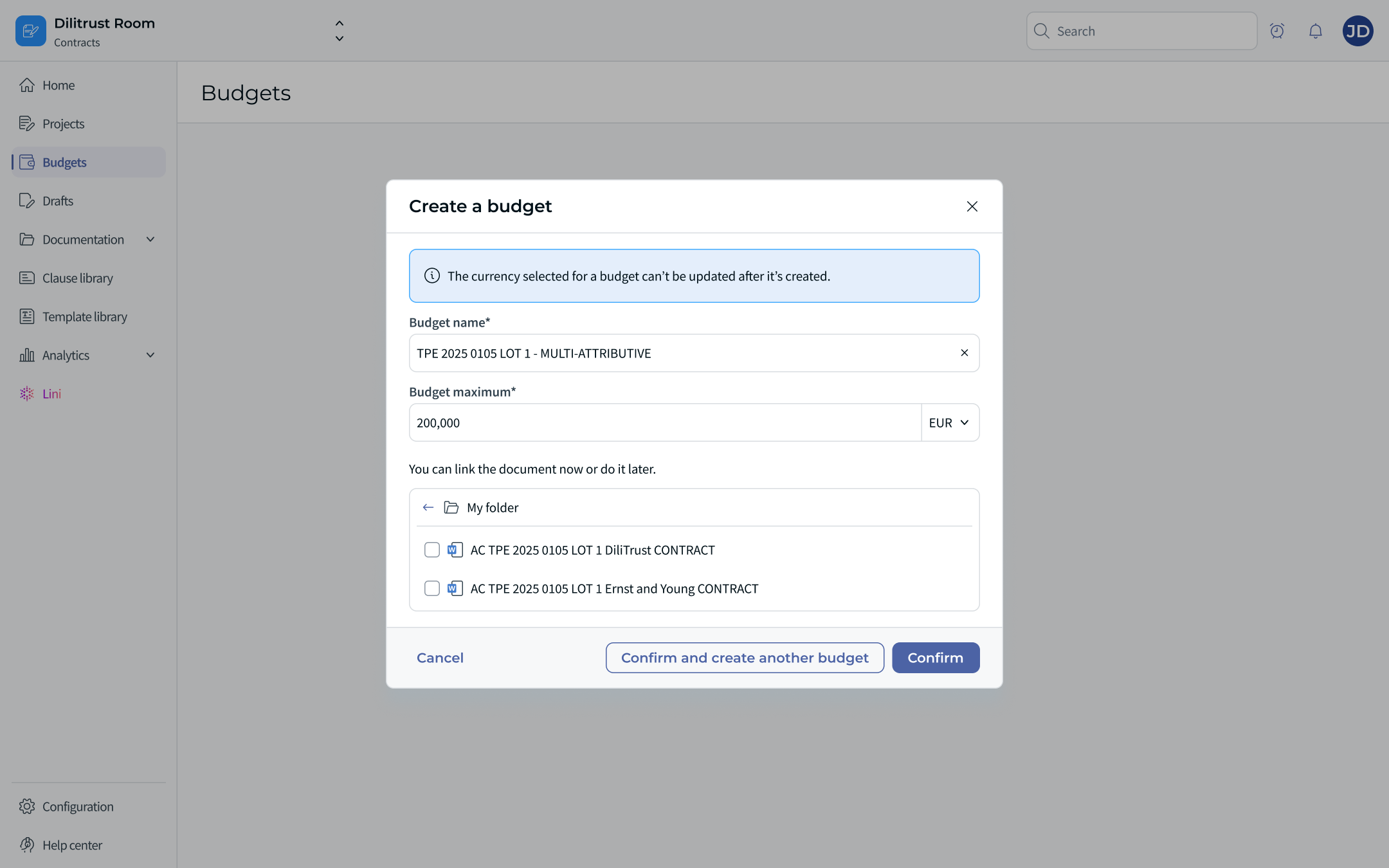
Figure 3 — The « Create a budget » window: name, maximum amount + currency selector, and document selector.
⚠️ A budget's currency cannot be changed after creation. An information banner reminds you: « The currency selected for a budget can't be updated after it's created. » The confirmation button stays disabled until the name, maximum amount and currency are filled in. If the wrong currency was selected, the only option is to delete the budget and create it again (there is no after-the-fact currency change).
⭐ The budget detail page (Budget overview)
A budget's page consists of its title, a Configure budget button (rename, change the maximum amount, etc.), a Link documents button, an Export button, the key metrics and a table of linked documents.
The header presents the budget's key metrics:
- Maximum budget — the maximum amount defined at creation (the only manually editable metric).
- Total invoiced amount — the total sum of all invoices received via the API from the linked documents, with a View expenses link. It may be shown as a negative value (consumption).
- Remaining budget = Maximum budget − amount invoiced (in the example: €200,000 with −€48,000 invoiced ⇒ €152,000 remaining).
ℹ️ An extended layout additionally separates ordered and invoiced amounts into five cards: Maximum budget, Total amount ordered, Remaining to order (= Maximum budget − Total amount ordered), Total amount invoiced and Remaining to invoice (= Total amount ordered − Total amount invoiced). See Figure 11.
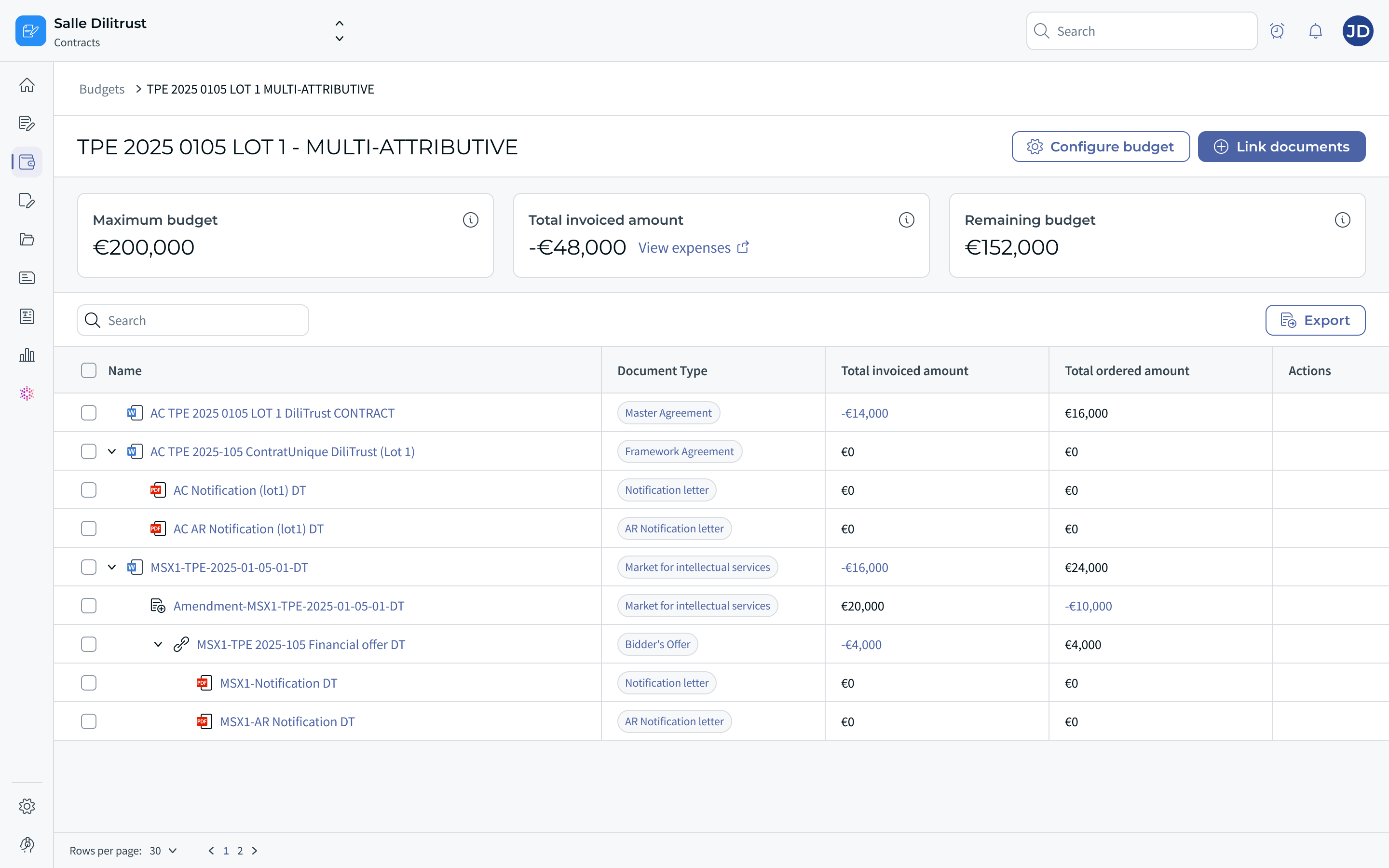
Figure 4 — Budget detail: metrics at the top, and the table of linked documents shown as a tree (Name, Document Type, Total invoiced amount, Total ordered amount, Actions). The whole contract bundle — parent, children and amendment — is displayed; some invoiced amounts appear negative.
The linked-documents table shows, for each document: its type (e.g. Master Agreement, Framework Agreement, Notification letter, AR Notification letter, Bidder's Offer…), its Total invoiced amount, its Total ordered amount and an Actions column (remove the document from the budget). Contract bundles are displayed as a tree view: the parent document, its children and any amendments all appear, so the whole bundle is visible.
⚠️ Negative amounts. Invoiced amounts can be displayed as negative values: they represent the amounts invoiced (consumed) against the budget. They are summed as-is into Total invoiced amount, which is why the remaining metrics follow the formulas above.
⚠️ When no expense exists for a document, the Total invoiced / Total ordered cells display « €0 »; the absence of an expense is otherwise distinct from a real zero amount.
⭐ Linking documents to a budget
There are two ways to link a document and a budget:
- Case A — from the budget page: using the Link documents button (described below).
- Case B — from the document: using the Link to a budget button in the Contract finance control panel (see Financial control from the contract).
From the budget page (Case A), click Link documents. A modal « Link documents to [budget name] » opens, with a Search by document name field, the chips of the documents already selected, and the folder tree (« My folder »). Each document shows its document type as a tag. Tick one or more documents to add them to the budget, then click Confirm.
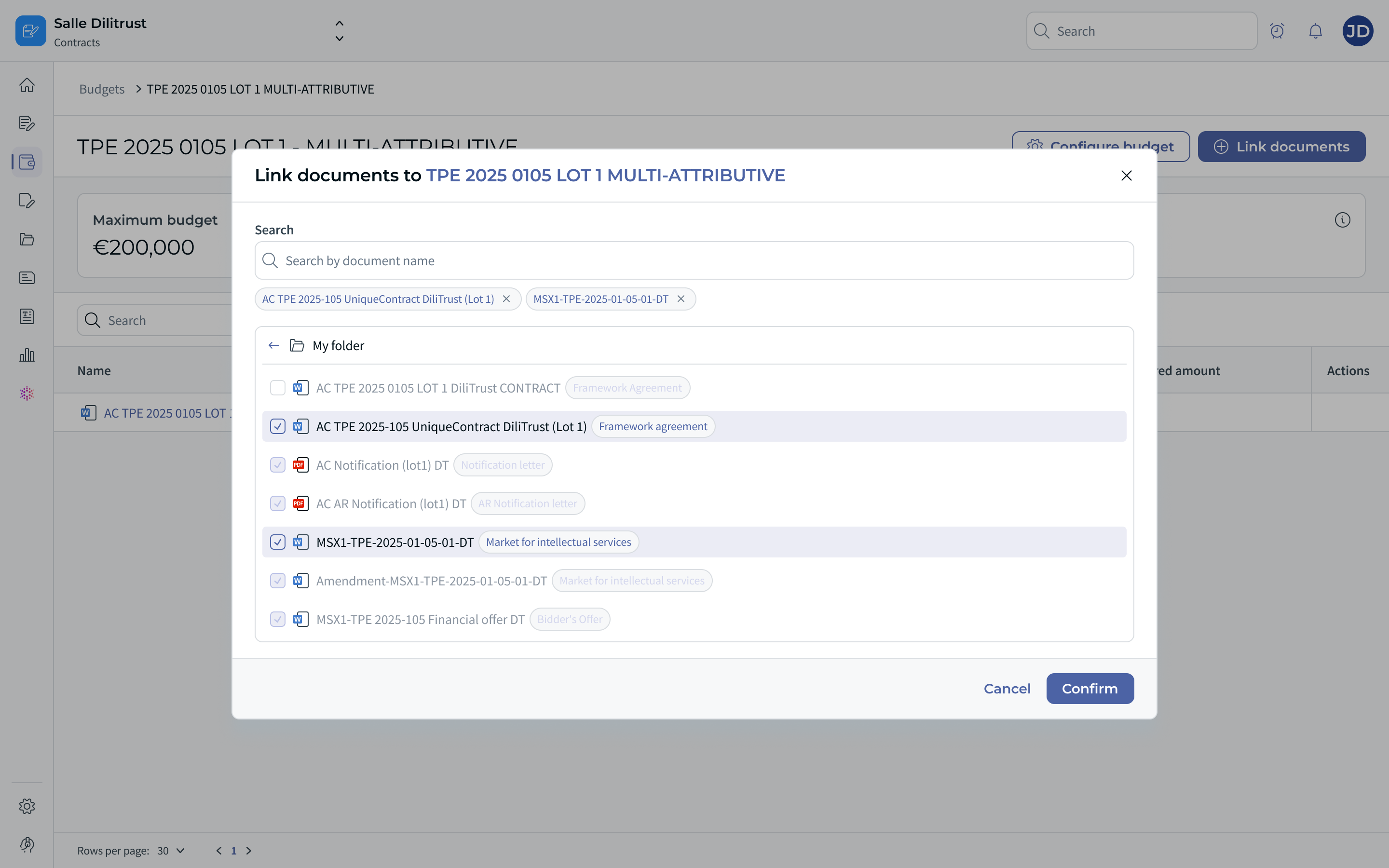
Figure 5 — The « Link documents » modal: search field, selected-document chips, document-type tags and multiple selection within the folder tree. A document that is already linked to another parent appears disabled and cannot be selected here.
Linking a whole bundle. Selecting the main (parent) document automatically links all the documents of its bundle: « Linking the main document automatically links all linked documents. » Documents already linked to another parent are shown disabled and cannot be selected from here.
Key points:
- Any document can be linked to a budget, whether signed or not.
- The same document or bundle can be linked to several budgets.
- Linking a bundle through its parent automatically includes the bundle's documents.
- A currency-mismatch check prevents adding a document whose currency differs from the budget's (a message indicates the document(s) cannot be linked).
⭐ Removing a document from a budget
In the table's Actions column, the delete icon lets you remove a document. A confirmation window appears before validation. You can also remove several documents at once via bulk selection (Select all → Remove documents from the budget).
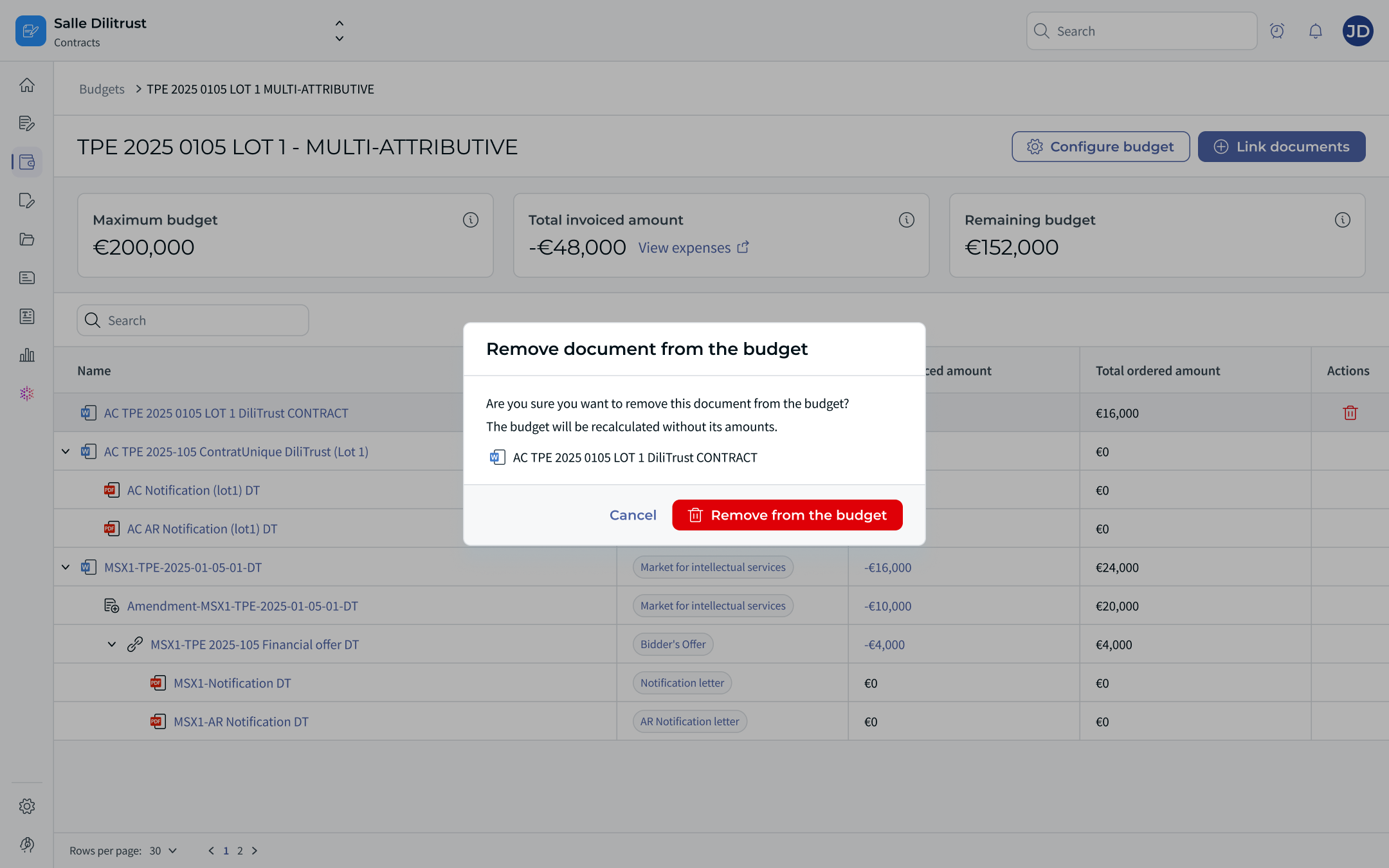
Figure 6 — « Remove document from the budget » confirmation: the budget will be recalculated without the removed document's amounts. When the document is part of a contract relationship, the whole relationship is removed.
After confirmation, the budget's Total invoiced and Remaining amounts are recalculated. If no expense was previously linked to the document, the amounts remain unchanged. If expenses were linked to it, they remain visible on the document's Expenses view.
ℹ️ A document can only be removed from a budget from the budget page: there is no remove action from the document view.
⭐ Viewing expenses (Expenses)
Expenses are aggregated data attached to a document (via its document_id) and fed by the API. They can be viewed at three levels:
- Document — the expenses of a single document.
- Bundle — when the document is a parent, its Expenses view also includes the expenses of its child documents; the Document column identifies which document each expense belongs to.
- Budget — via the View expenses link on the Total invoiced amount card: the consolidated expenses of all the budget's documents.
Each Expenses page shows two metrics — Total invoiced amount (the total sum of all invoices received via the API from the linked documents) and Total ordered amount (the total sum of committed or ordered amounts) — and a table with the following columns:
| Column | Description |
|---|---|
| Name | Expense name (e.g. an order reference). |
| Ordered amount | Committed / ordered amount (not aggregated). |
| Invoiced amount | Invoiced amount (not aggregated); can be negative (consumption). |
| Document | The document the expense is attached to (shown at bundle and budget level). |
| Date | Expense date. |
| Third party | The supplier / third party. |
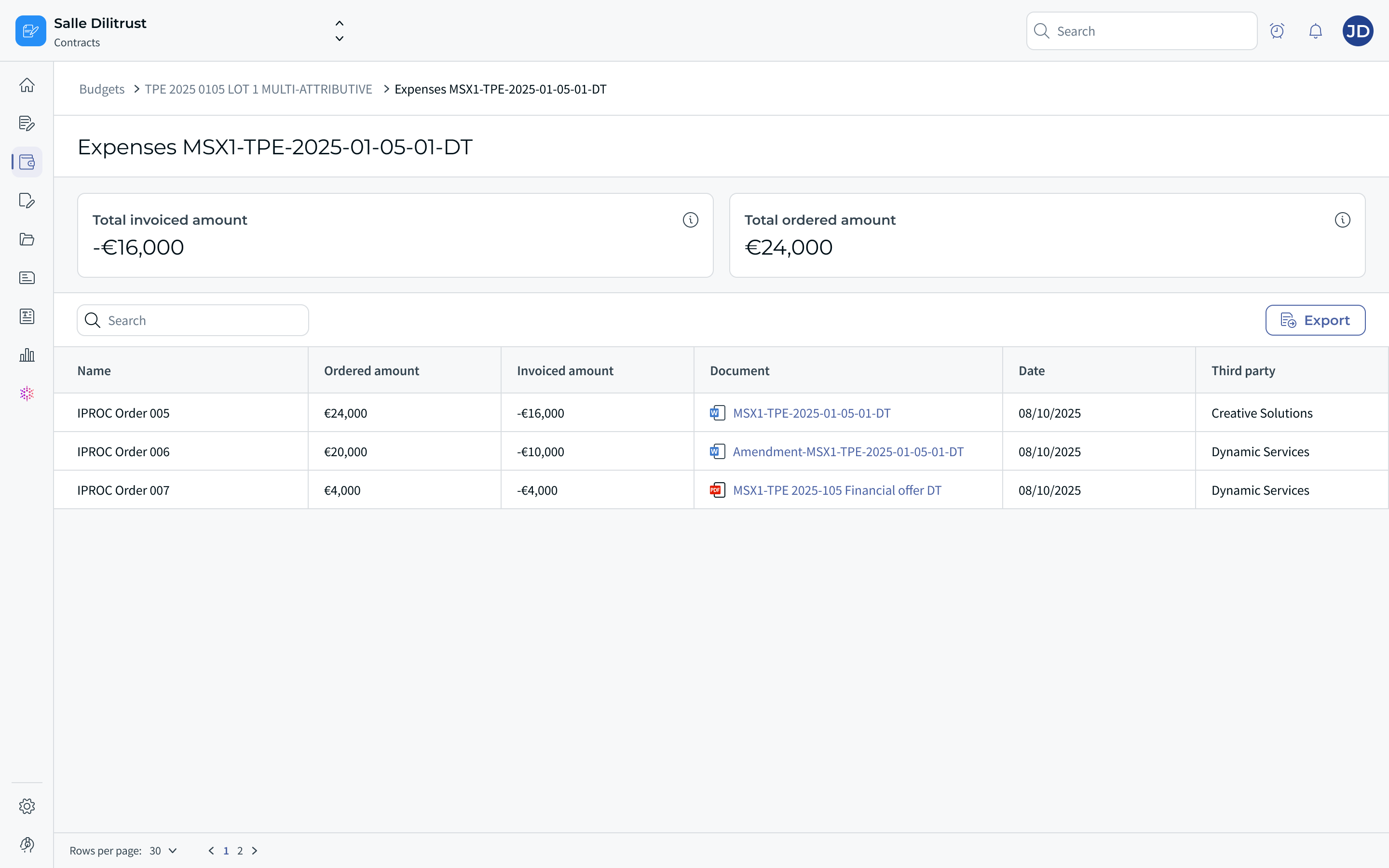
Figure 7 — Consolidated Expenses view at bundle/budget level: each line shows the order, its ordered and invoiced amounts, the related Document, the date and the third party.
ℹ️ The metric cards only appear when at least one expense exists; otherwise the page shows « There are no expenses yet. » Expense information is read-only.
⚠️ Level-1 / level-2 propagation. A budget created at the level of a contract (level-1) does not automatically pull in the expenses of level-2 documents (sales orders / purchase orders, SO & PO) that are only contractually linked to it. To see them, those documents must be linked to the relevant budget (a mere contractual relationship does not trigger propagation).
⚠️ Currency of expenses. Each expense has its own currency and exists independently of any budget. There is no guarantee that an expense and the budget it is later linked to share the same currency: expenses are not converted and their currency does not change to match the budget's. This is also why a budget does not support multi-currency linking (see Rules and special cases).
⭐ Financial control from the contract (Contract finance control)
A new Contract finance control panel is available in the document view (side panel), dedicated to the document's budgets and expenses. It has two tabs: Expenses and Budgets.
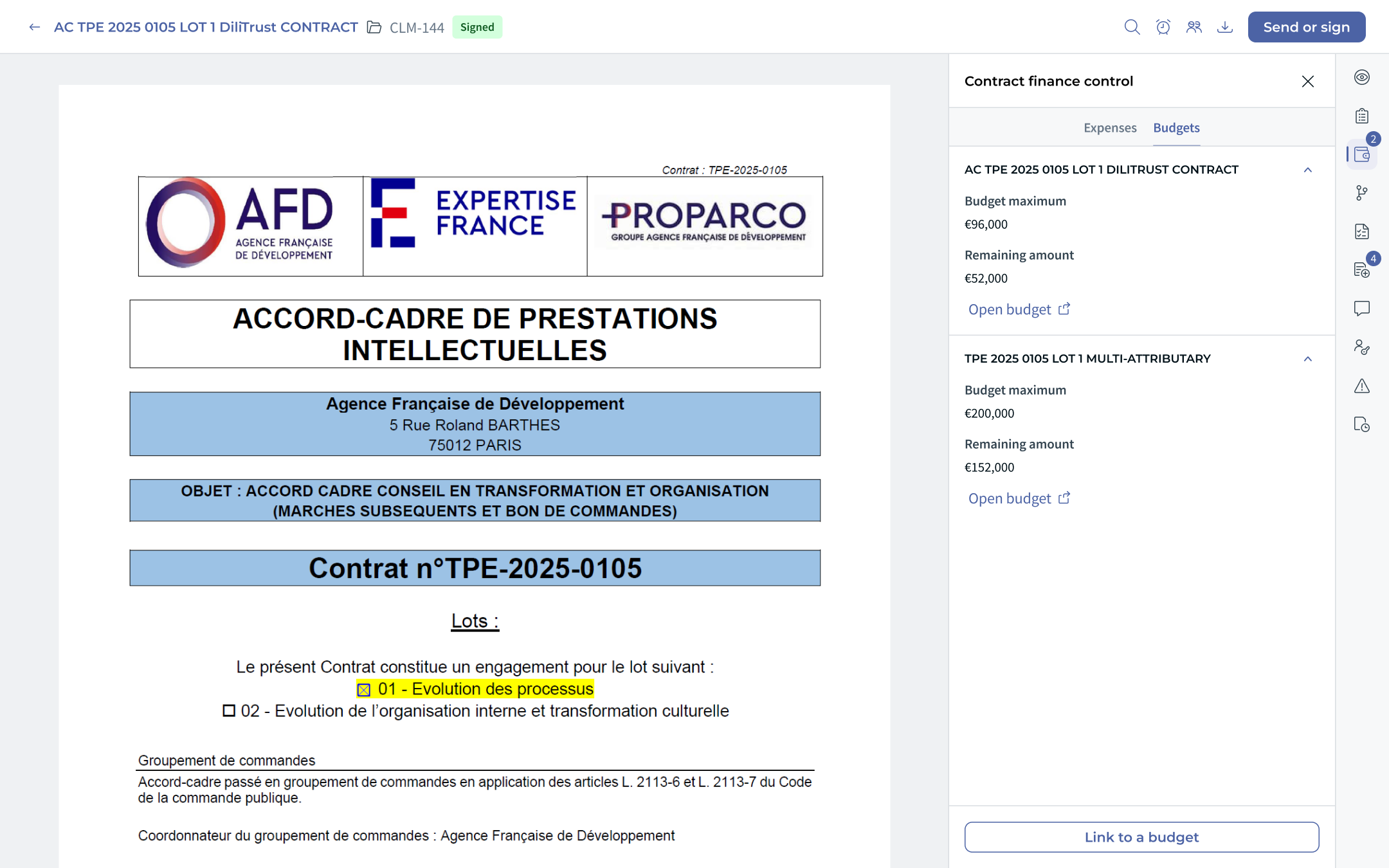
Figure 8 — Budgets tab: list of all budgets the document is linked to (Budget maximum, Remaining amount, « Open budget » link). A document can be linked to several budgets.
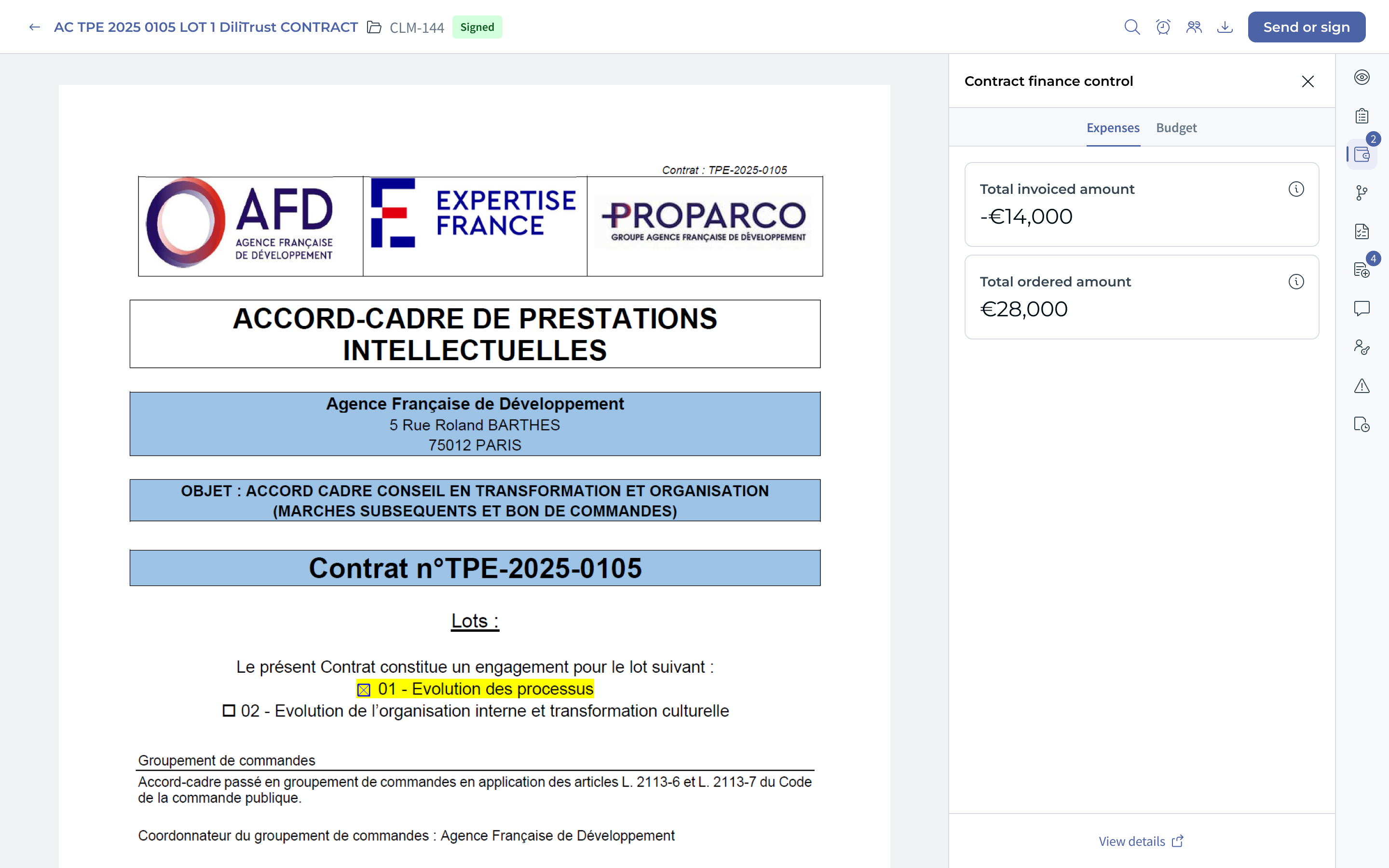
Figure 9 — Expenses tab of the Contract finance control panel: Total invoiced amount and Total ordered amount for the document (or for the whole bundle if the document is a parent). The View details link opens the full consolidated Expenses page (see Figure 7).
From the Budgets tab, the user can open an existing budget or link the document to a budget via the Link to a budget button (Case B above): search for an existing budget by name, or create a new one (Budget name + Maximum budget and currency) directly from the contract.
ℹ️ Creating a budget directly from the contract is possible, but the recommended approach is automatic creation from the summary sheet (see below): it limits input errors and encourages teams to complete their summary sheets.
ℹ️ To detach a document from a budget, you must go through the budget page: direct detachment from the document view is not provided.
⭐ Automatic budget creation from the summary sheet
This is the recommended way to create a budget. A budget is created automatically when all the following conditions are met:
- the document has a Maximum Budget Amount attribute (amount type) with a filled value in its summary sheet;
- the document's summary sheet is completed;
- no budget is already linked to the document.
ℹ️ As long as the summary sheet is not completed, no budget is created automatically. Once it is completed (and the conditions above are met), the budget is generated.
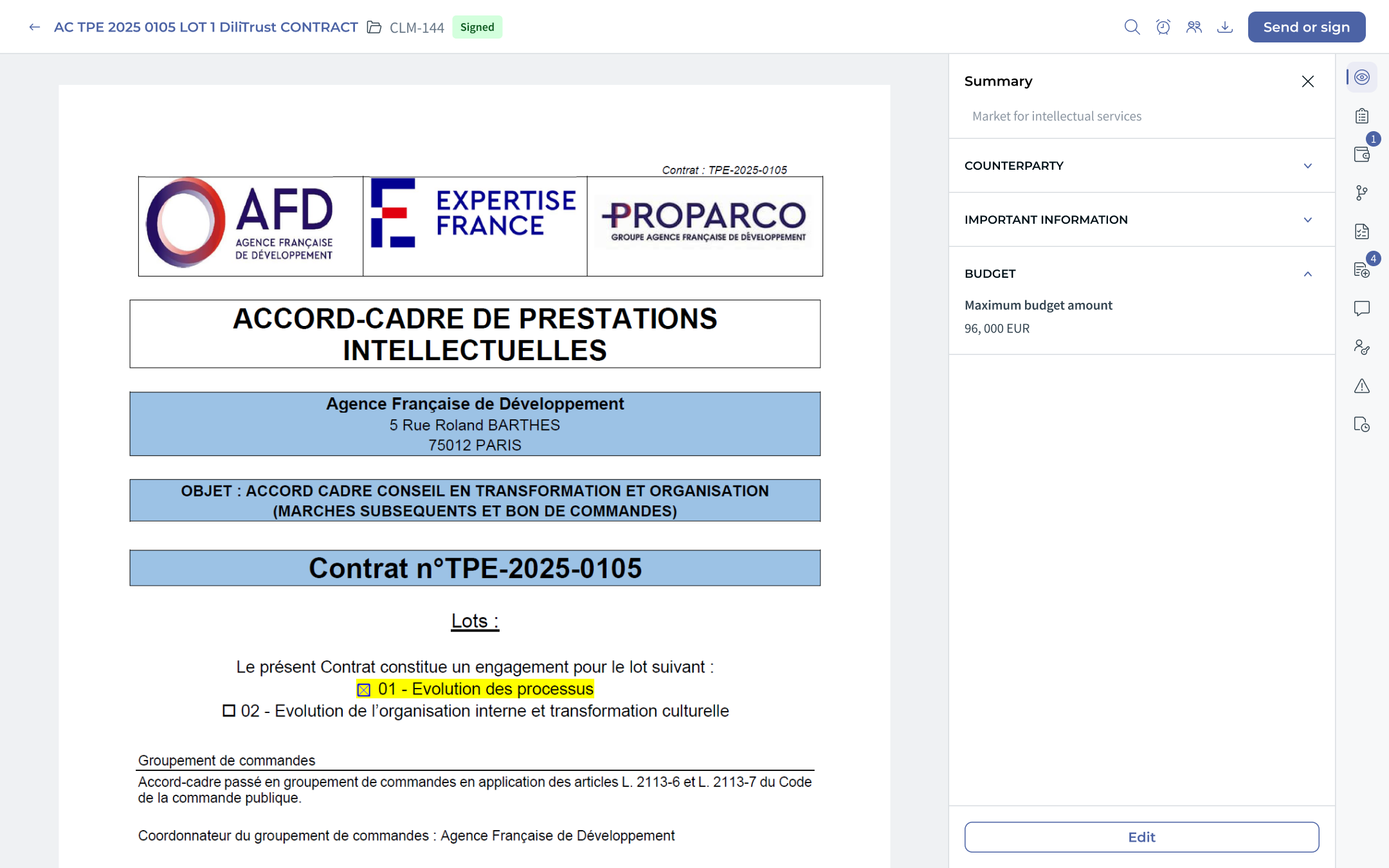
Figure 10 — BUDGET section of the summary sheet: the value of the « Maximum budget amount » attribute is used as the maximum amount of the auto-created budget.
The auto-created budget inherits the document's name, and the value of the specific attribute is used as the maximum amount. It is then accessible from the Budgets page and from the document's Contract finance control panel.
If the attribute value is changed after a budget has already been created from it, a pop-up lets the user choose to overwrite the budget's maximum amount with the new value or keep the current one.
ℹ️ The budget becomes an independent entity. Auto-creation is offered for ease of use, but once created the budget is decoupled from its source document: in particular, it persists even if that document is later removed from it, and its calculation history is preserved.
⚠️ Automatic extraction fails if the attribute's currency differs from that of a budget or of expenses already attached to the document: the currency must stay consistent with the budgets/expenses already associated.
⚠️ Rules and special cases
- Locked currency — a budget's currency is frozen as soon as at least one document is attached to it (not only upon receipt of expenses).
- Currency mismatch — this version does not support multi-currency budgets. If you try to link a document whose currency (of the amount attribute) differs from the budget's, the document is disabled in the selector and a message indicates that the selected document(s) cannot be added.
- Expense scope — budgets and expenses are tracked at document level; an annex cannot carry its own budget or expense.
- Negative invoiced amounts — invoiced amounts can be negative (consumption); they are summed as-is into the budget's totals.
- Cancelled expenses — expenses with the CANCELLED status are excluded from remaining-amount calculations. A cancelled order leaves « Remaining to order », and a cancelled invoice leaves « Remaining to invoice ».
- Permissions — creating and managing budgets follows the access rights configured by the administrator (see the Permissions and access section).
2️⃣ Scope 2: Budget reminder / monitoring system
Scope 2 adds a reminder system: the user selects a budget metric and chooses to be notified when it reaches a defined threshold.
⭐ Creating an alarm rule
Rules are managed from Configuration → Alarm rules → Budget alarm rules. Click Create rule, then define:
- Name / Description — the rule label (e.g. « Threshold alert - 90% of the invoiced limit »).
- Notify owner and Notify users or teams — the recipients (the Document creator checkbox, plus users or teams).
- Notify when — the monitored metric: Total invoiced amount or Total ordered amount, with the condition is more than.
- Value — the trigger threshold, expressed as a percentage (e.g. 90%).
- Notification frequency — Daily, Weekly, Monthly or At milestone.
Save with Save alarm.
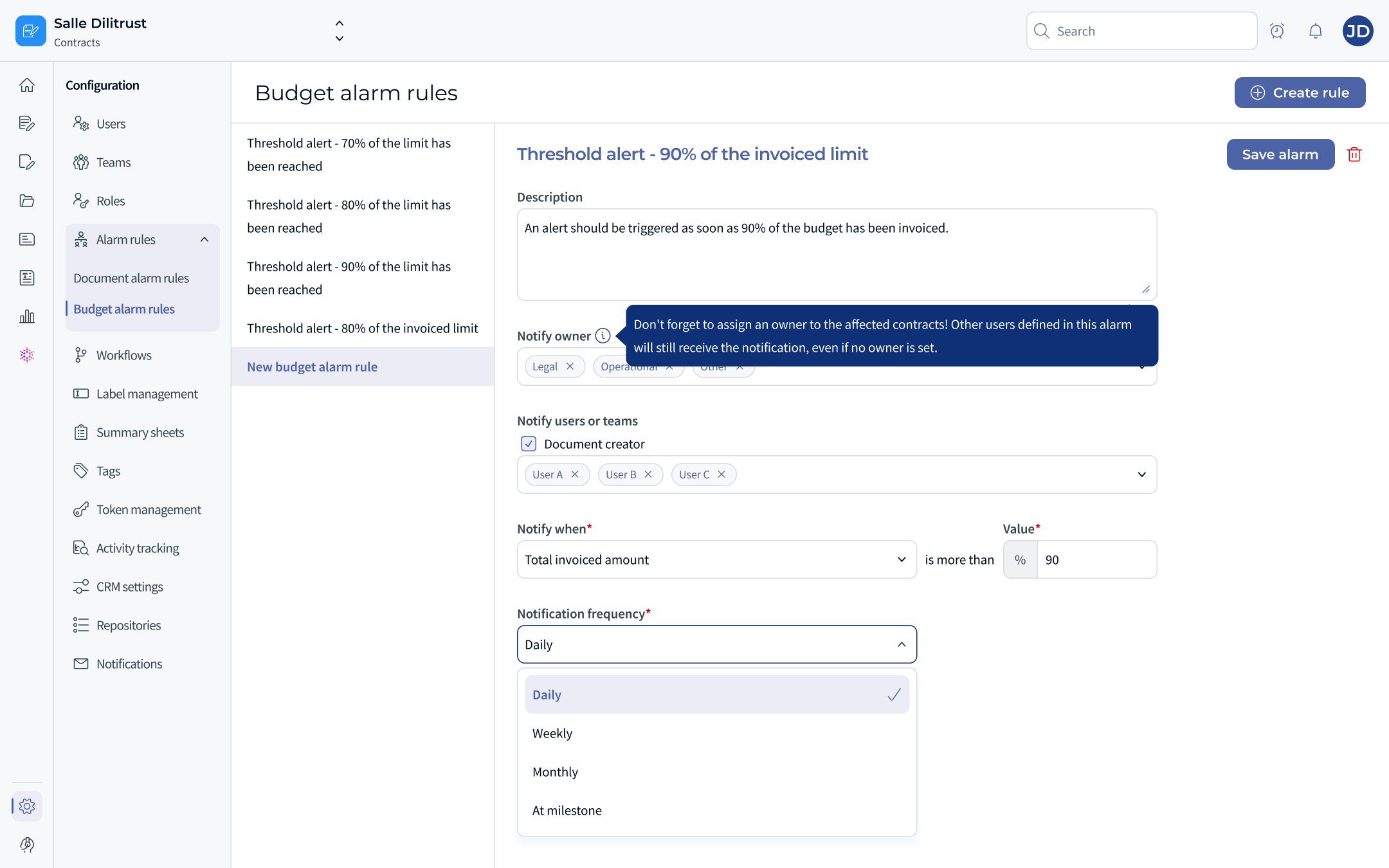
Figure 12 — The « Budget alarm rules » screen: list of existing rules on the left, configuration form (recipients, metric, threshold, frequency) on the right.
ℹ️ Owner. Remember to assign an owner to the affected contracts. The other users defined in the alarm will still receive the notification even if no owner is set.
⚠️ Operating rules
- Scope — alarm rules apply to all budgets. It is not possible to create an alarm for an individual budget.
- Monitored metrics — thresholds are defined as a percentage of Total invoiced amount or Total ordered amount.
- Overlapping thresholds — only the highest threshold crossed triggers a notification (the maximum threshold takes priority), including across different rules. Example: with >70% and >80% thresholds, if the invoiced total reaches 85%, only the >80% alert fires.
- Permissions — creating and editing reminders follows the existing budget permissions; there is no separate permission for reminders.
3️⃣ Scope 3: Columns / filters or Analysis / Analytics
Scope 3 improves how the module's tables are used: choosing the displayed columns, advanced filtering, and export.
⚙️ Manage columns
The Manage columns button opens a « Select columns to display » window where you choose the columns from a list and reorder them. The Name column is mandatory and always shown.
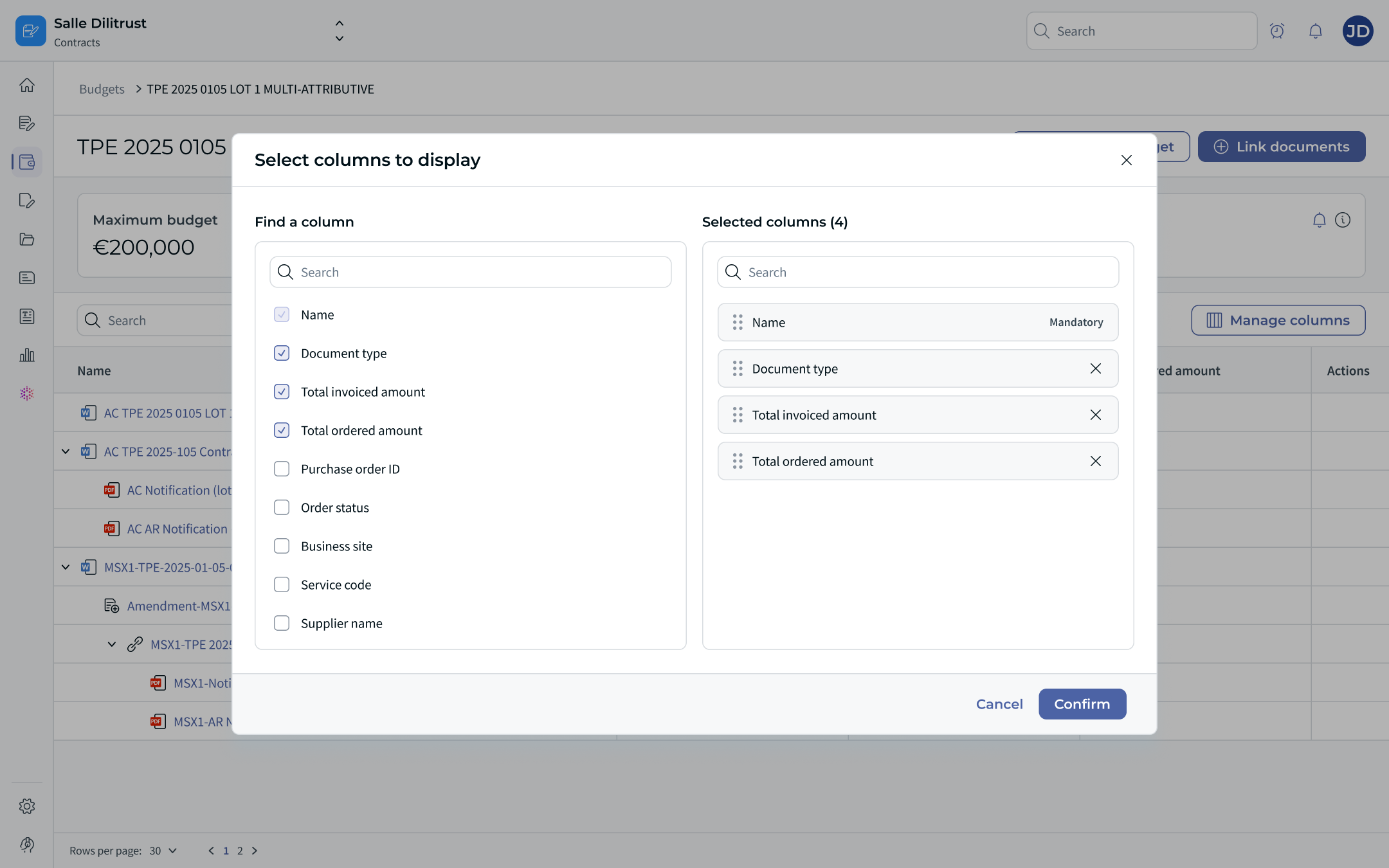
Figure 13 — Column management for the Budget table.
Budget table — available columns: Name (mandatory), Document type, Total invoiced amount, Total ordered amount, Purchase order ID, Order status, Business site, Service code, Supplier name.
Expenses table — default columns: Name, Ordered amount, Invoiced amount, Document, Date, Third party. Additional columns available include Document type and Nature of the link.
ℹ️ The expense data fed by the API can also carry, depending on the client's configuration: Invoice status (authorized_for_payment, awaiting, cancelled, fully_refunded, internal_review, new, partially_refunded, payment_confirmed, project_validation, refund_pending), Order status (approved, cancelled, closed, open), Payment date, Order date, and custom fields (an array of fields configured beforehand by the DiliTrust support team — e.g. Supplier location, Business Unit Code, Project number).
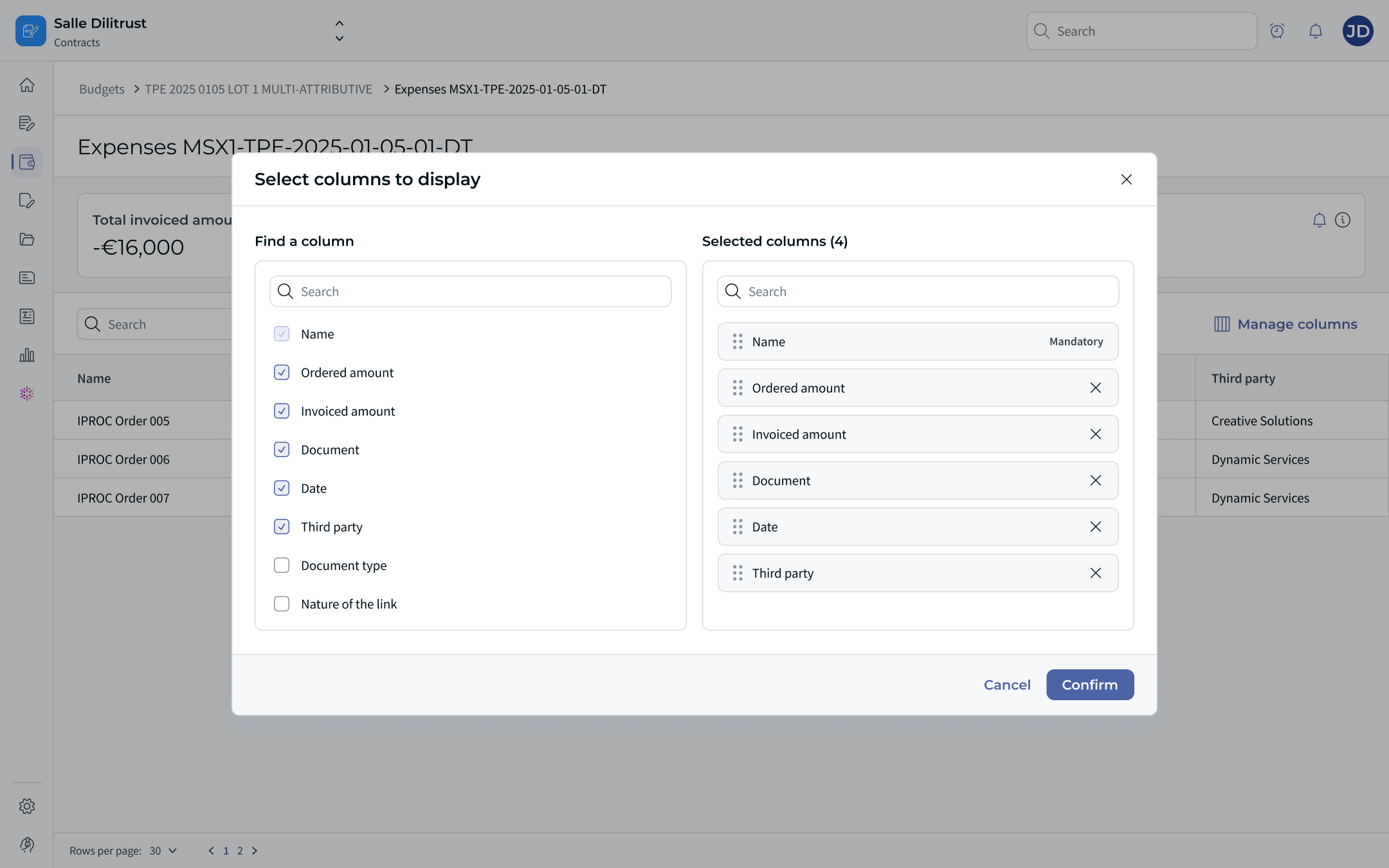
Figure 14 — Column management for the Expenses table.
⚙️ Filters
The Filters button opens a side panel. Filters are available both on a budget's detail page and on the Expenses views.
- On a budget: Documents, Document type, Maximum budget, Amount ordered, Remaining to order, Amount invoiced, Remaining to invoice. Each criterion offers a condition (Is, Is not, Is empty, Is not empty; for amounts: Greater than, Equal to, Less than, Between, Not between…) and a value (or a From/To range for amounts).
- On the Expenses view: Ordered amount, Remaining to order, Invoiced amount, Remaining to invoice, Supplier, Order date…
An Always show main document toggle keeps the parent document visible, and a Clear filters action resets the panel.
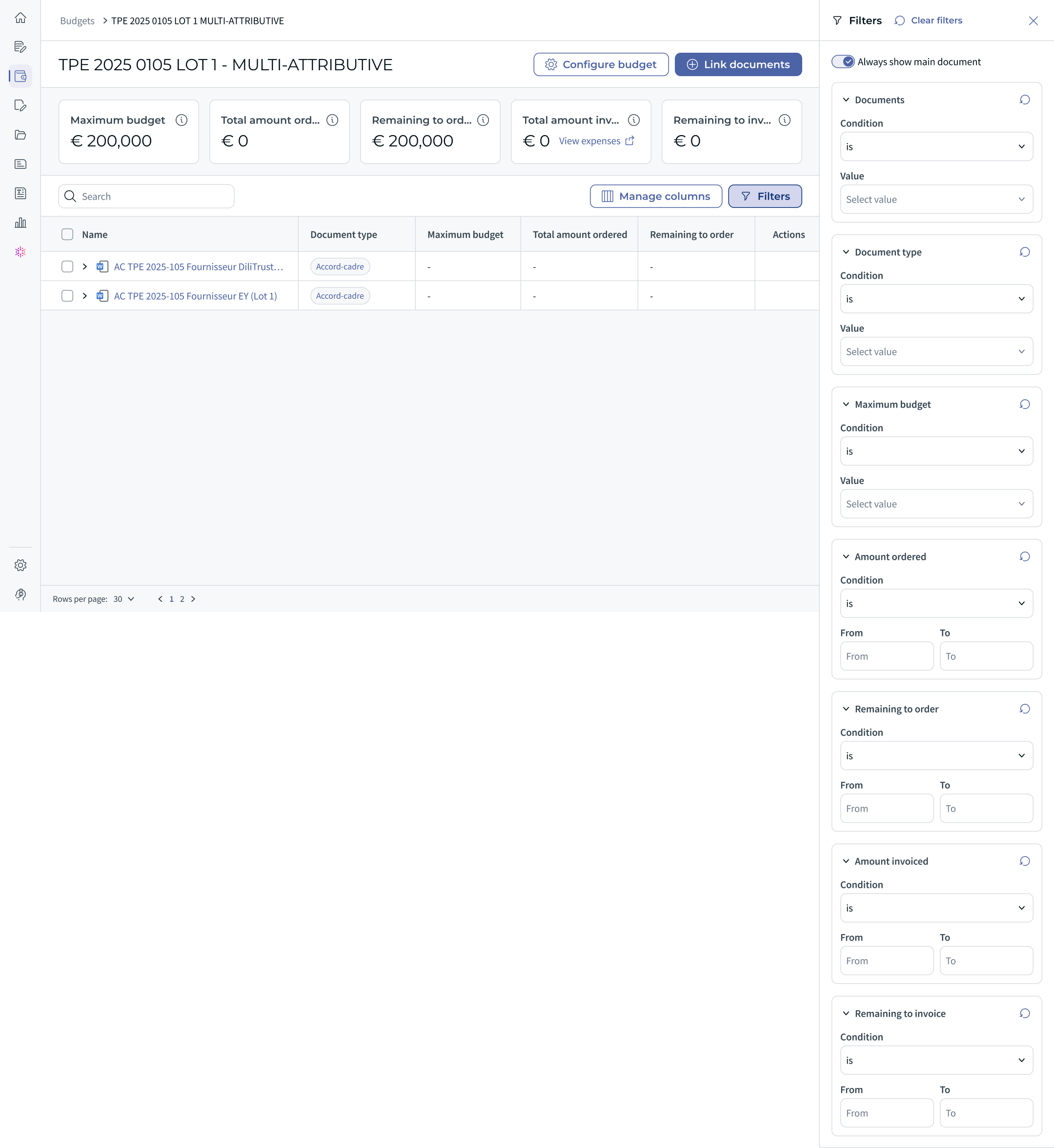
Figure 11 — The « Filters » panel open on a budget page, with the « Always show main document » option and the « Clear filters » button, alongside the extended metric layout (Maximum budget, Total amount ordered, Remaining to order, Total amount invoiced, Remaining to invoice).
⚙️ Export
An Export button is available from:
- the budget detail page (the linked-documents table — see Figure 4);
- the Expenses views (document, bundle and budget level — see Figure 7).
ℹ️ A consolidated export from the global Budgets page is coming soon.
⭐ Best practices
- Favour automatic budget creation from the summary sheet; keep manual creation for framework-agreement envelope budgets.
- Link a bundle through its parent document to attach all its documents at once.
- Adopt a clear and consistent naming convention (e.g. « AFD – Contract 2025 – IT Services ») to find your budgets easily.
- Check the currency right at creation: it can no longer be changed once a document is attached.
- Regularly review the Contract finance control panel of active contracts to track expenses without switching screens.
- Configure alarm rules to anticipate overruns, and remember to set an owner on the affected contracts.
- Use column management, filters and export to prepare your reviews.
⚠️ Limitations and points of attention
- A budget's currency is immutable after creation and the module does not handle multi-currency budgets (consistency check at linking time). Expenses keep their own currency and are not converted.
- Budget and expense tracking happens at document level: an annex cannot carry its own budget or expense.
- Level-1 budgets do not automatically propagate level-2 expenses: the documents concerned must be linked to the budget.
- Expenses are read-only in the module and fed via the API; cancelled expenses (CANCELLED, on both the order and invoice side) are excluded from remaining amounts.
- Invoiced amounts can be negative (consumption).
- Alarm rules apply to all budgets (not to an individual budget) and only on the Total invoiced / Total ordered metrics; only the highest threshold crossed triggers a notification (including across rules).
❓ Frequently asked questions
How does automatic budget creation work?
A budget is created automatically when a document has a Maximum Budget Amount attribute (amount type) with a value in its summary sheet, the summary sheet is completed, and no budget is already linked to the document. The budget inherits the document's name and the attribute value as its maximum amount. Once created, it behaves as an independent entity (it persists even if the document is later removed). If the attribute value changes afterwards, a pop-up lets you overwrite or keep the budget's maximum amount.
How are the remaining amounts calculated?
In the standard view, Remaining budget = Maximum budget − amount invoiced. In the extended view, Remaining to order = Maximum budget − Total amount ordered and Remaining to invoice = Total amount ordered − Total amount invoiced (you can only invoice what has been ordered). Invoiced amounts can appear as negative values (consumption).
Can a document be linked to several budgets?
Yes. The same document or bundle can be associated with several budgets. Selecting a parent document links the whole bundle at once.
Who can create and manage budgets?
Rights are configured by the administrator (see the Permissions and access section). Administrators, Editors and Contributors can be granted read/write or read-only access to budgets and expenses; Validators and Readers have no access.
How am I warned of a budget overrun?
Through budget alarm rules (Scope 2): configure one or more thresholds (as a percentage of the Total invoiced or Total ordered amount) and the chosen recipients are notified when a threshold is crossed.
Can I edit an expense amount in the module?
No. Expenses are aggregated, read-only data fed via the API from the client's ERP, and they keep their own currency.
What happens if I remove a document from a budget?
After confirmation, the budget's invoiced and remaining totals are recalculated without the removed document's amounts. If no expense was linked to the document, the amounts remain unchanged; if expenses were linked, they remain visible on the document's Expenses view. A document can only be removed from the budget page. A budget created from a document persists even if that document is later removed.
Can an annex carry its own budget?
No. Budget tracking and expenses attach at document level; an annex is attached to its document and does not carry its own budget or expense.
Was this article helpful?
That’s Great!
Thank you for your feedback
Sorry! We couldn't be helpful
Thank you for your feedback
Feedback sent
We appreciate your effort and will try to fix the article