The Orgchart feature in DiliTrust gives you a real-time visual representation of your corporate group structure. This section covers everything you need to get started, navigate the tool, and resolve common issues.
⭐ What is it for?
The Orgchart is designed to support the day-to-day needs of legal and corporate teams. Use it to:
- Visualise your entire group structure at a glance, even for complex groups with hundreds of entities
- Prepare reports for board meetings, audits, or due diligence by exporting your custom views
- Simulate future structures (like a planned acquisition or restructuring) using Manual Edit Mode, without modifying your live database
☝️ How to access the Orgchart?
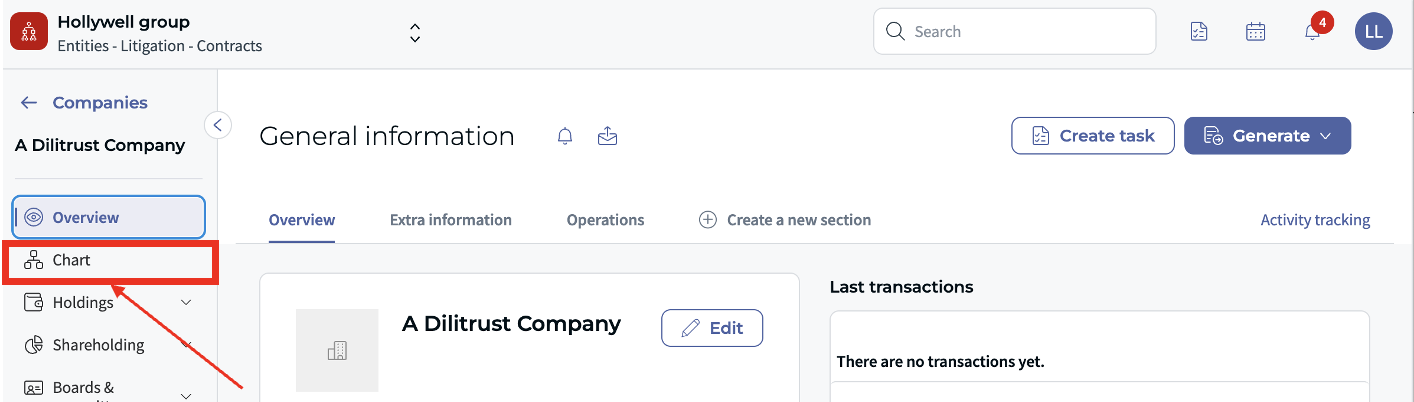
- Log in to DiliTrust
- Navigate to the Entities module from the left-hand menu
- Click the Chart tab at the top of the screen
Your corporate structure loads automatically, displaying all entities linked in your group.
⏩ Best Practices
If you are just getting started, these best practices are the perfect guide. You will learn how to configure your chart, scope your views, and collaborate efficiently.
✨ What's new?
We've recently shipped a series of improvements to the Orgchart, including a redesigned interface, colour coding by entity type, and a new Manual Edit Mode for simulating and presenting your group structure without affecting your live data.
✅ How-to guides
Step-by-step instructions for the most common tasks in the Orgchart.
- How to Filter the Orgchart
- How to Export the Orgchart
- How to Display the Ownership Chain
- How to save and manage views
- How to use the Manual Edit Mode
❓ FAQ & Troubleshooting
Something not working as expected? Find answers to the most common questions and issues below.
❗ Still need help?
If you can't find what you're looking for, our support team is here to help.
Was this article helpful?
That’s Great!
Thank you for your feedback
Sorry! We couldn't be helpful
Thank you for your feedback
Feedback sent
We appreciate your effort and will try to fix the article