⭐ Introduction
Restricted access — Attribute sharing is available only to selected clients under a specific contractual agreement. If you believe you should have access but cannot see the feature, contact your Customer Success Manager.
Attribute sharing lets you reuse a value that has already been entered in a document's Summary Sheet in another document, and keep track of where that value came from. You share with one document at a time, and where the target already holds a value for that attribute, the shared value replaces it. It is meant for the key data that must stay identical across related documents, such as an expiration date, a counterparty name, a contract value or an applicable law.
Sharing does not require the documents to belong to the same contract bundle: a value can be shared with any document you can access. Contract bundles are described in CLM – Contract Relationships.
Article contents:
- ⭐ Introduction
- ⭐ Permissions and access
- ⭐ How attribute sharing works
- ⭐ Sharing an attribute
- ⭐ Sharing a repository entry
- ⭐ Viewing attribute traceability
- ⭐ Changing or removing a shared value
- ⭐ Interactions with other modules
- ⭐ Best practices
- ❗ Limitations and points of attention
- ❓ Frequently asked questions
⭐ Permissions and access
- Read & write access to the source document is required to share one of its Summary Sheet attribute values.
- The target document must be accessible to you.
- Attribute sharing is permission-aware: it can target any document you can access, whether or not it belongs to the same contract bundle.
- To see where an inherited value comes from, you need read access to the source document.
⭐ How attribute sharing works
- Source and target. The document that holds the original value is the source; the documents that receive it are the targets.
- One-way copy. The value goes from the source to the target, and a target never pushes a value back to the source. If the target already holds a value for that attribute, the shared value replaces it: the previous content is overwritten and cannot be restored.
- Only populated attributes. An attribute can be shared only once it has a value.
- No limit on targets. The same value can be shared with as many accessible documents as you need, one document at a time.
- Independent of bundles. Sharing depends neither on bundle membership nor on the nature of link.
- Appendix. Documents linked as Appendix can neither share nor receive attribute values.
Attributes commonly shared include expiration date, contract holder, contract value, counterparty name, applicable law and maximum budget amount.
⭐ Sharing an attribute
- Open the source document and locate the populated attribute in its Summary Sheet.
- Hover over the attribute and click the Share icon.
- Select the accessible target document. Sharing with several documents in a single action is not available; repeat the steps for each additional document.
- If the target document already holds one or more values for this attribute, choose what the shared value should do: replace one of the existing values, or be saved under Shared attributes without replacing anything. Shared attributes is preselected by default.
- Confirm the action.
Each existing value is listed with the Summary Sheet section it belongs to, so you can tell them apart, and empty fields are offered as well. Choosing Shared attributes leaves every existing value untouched.
A badge next to the Share icon indicates how many target documents currently receive the value.
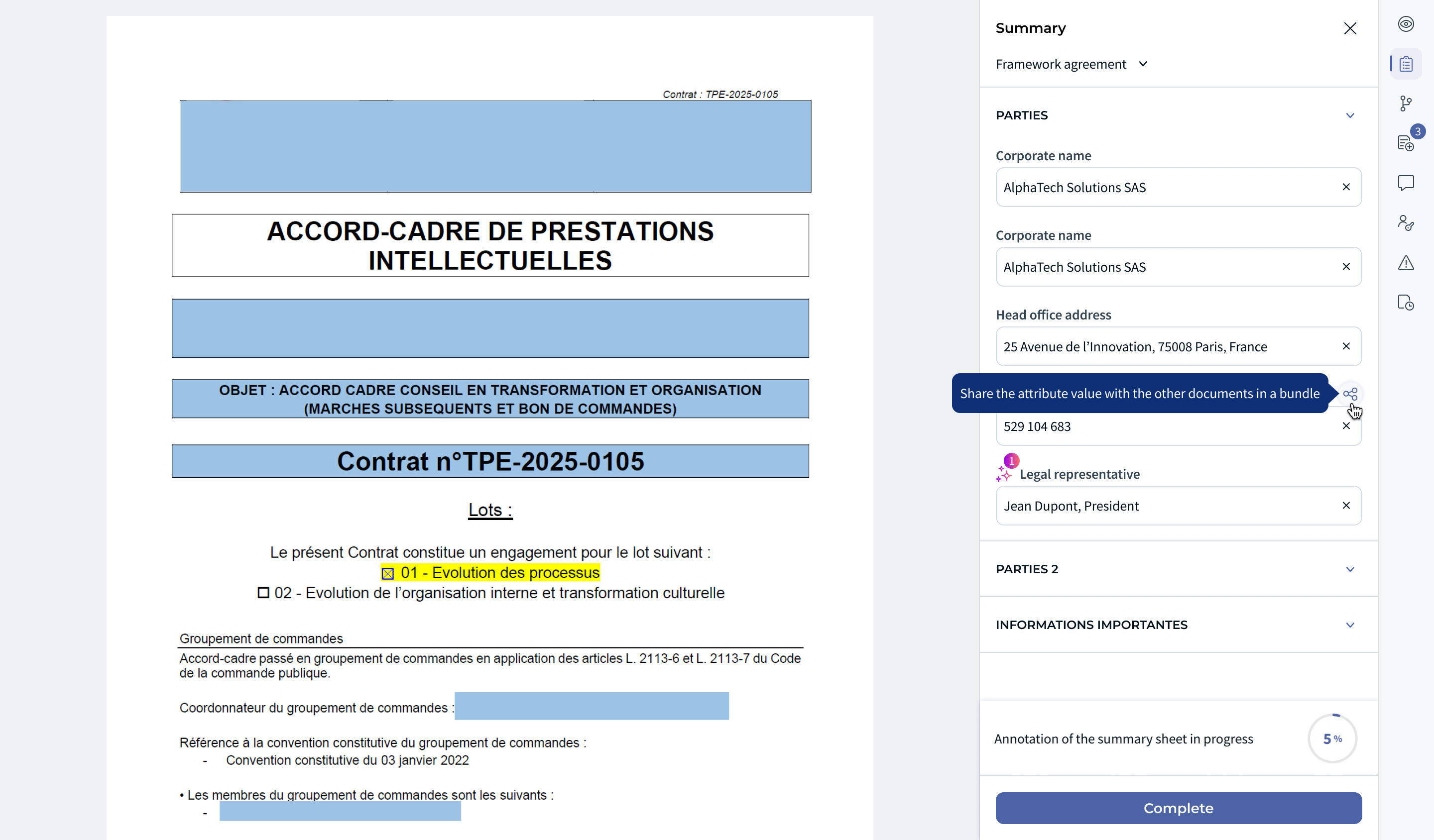
Figure 1: Share icon and shared-document count
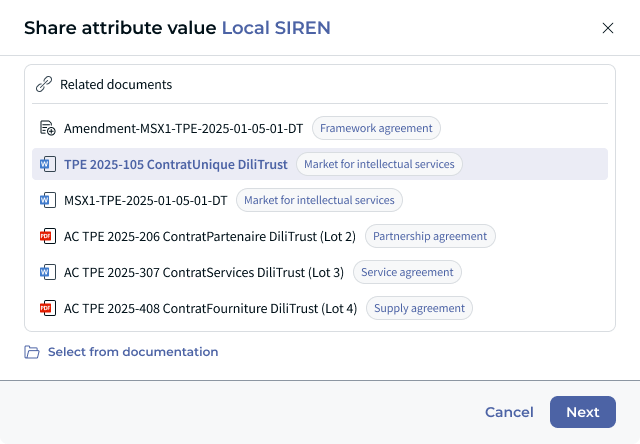
Figure 2: Selecting target documents
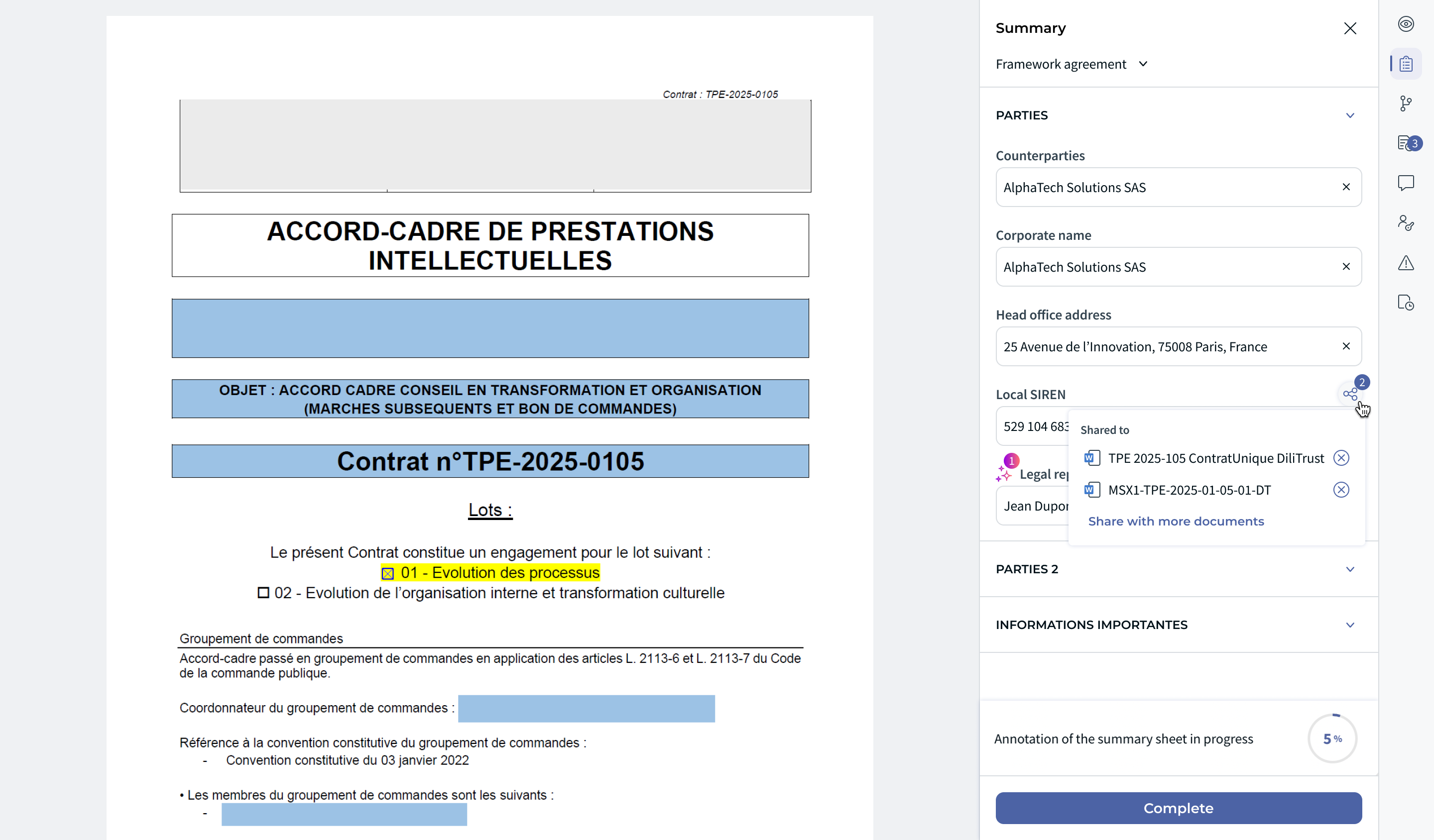
Figure 3: Shared attribute and target count
⭐ Sharing a repository entry
Besides sharing a single attribute, you can share a whole repository entry — for example a supplier or counterparty section, with the fields it contains.
In the Summary Sheet, hover over the repository section header and click the Share icon. The tooltip reads Share this repository entry with other documents.
⭐ Viewing attribute traceability
An inherited value is marked with a shared icon in the target document's Summary Sheet. Hover over or click the icon to view the source document, subject to your access rights.
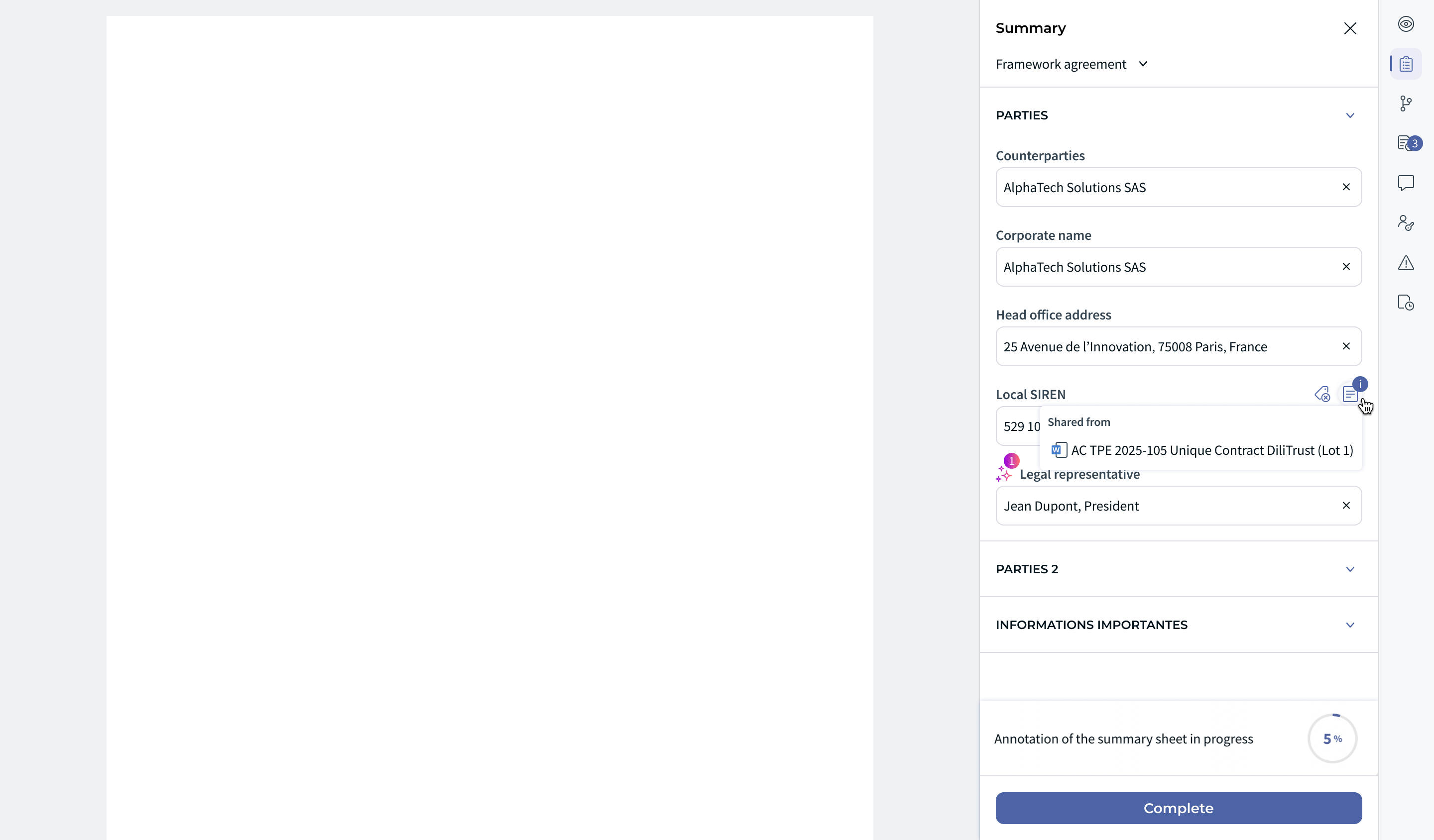
Figure 4: Attribute traceability on a target document
⭐ Changing or removing a shared value
| What you do | What happens |
|---|---|
| Edit the value on the source document | You are asked whether to disconnect the share. If you confirm, the share is disconnected and the target documents keep their previous value — the new value is not propagated. |
| Edit the value on a target document | After confirmation, the share is disconnected for that target only. The other targets are not affected. |
| Remove a target (click the X next to the target document and confirm) | The value is cleared on that target and must be entered again if needed. |
⭐ Interactions with other modules
- Contract bundles — sharing works with or without a bundle, but bundles are the most common context for it. See CLM – Contract Relationships.
- Budgets — the Maximum Budget Amount attribute of a Summary Sheet is what drives automatic budget creation. See CLM – Contracts Budget Management.
- Contracts screen — a shared value is displayed in the result columns like any other Summary Sheet attribute. See CLM – Contract Filter & Search.
⭐ Best practices
- Use attribute sharing for the values that must stay consistent across related documents, rather than retyping them.
- Capture shared values on the contracts themselves, not on their appendices: documents linked as Appendix can neither share nor receive values.
- Check traceability before editing a shared value, so that you know which documents are affected.
- After editing a value on a source document, review the target documents: they keep the previous value.
❗ Limitations and points of attention
- Attribute sharing is available only to selected clients under a specific contractual agreement.
- Documents linked as Appendix can neither share nor receive attribute values.
- Only an attribute that already has a value can be shared.
- Sharing is a one-way copy that overwrites the target value. There is no continuous synchronization between the source and its targets, and a replaced value cannot be rolled back.
- Editing the value on the source or on a target disconnects the share after confirmation.
- A document you cannot access cannot be used as a target.
❓ Frequently asked questions
Does attribute sharing depend on the nature of link or on bundle membership?
No. A value can be shared with any document you can access, whether or not it belongs to the same contract bundle. The only exception is documents linked as Appendix, which can neither share nor receive values.
Why can't I share a value with an appendix?
Documents linked as Appendix can neither share nor receive attribute values. If the document should take part in sharing, link it with another nature of link, such as Amendment, Subcontract or Others.
How do I know whether a value was shared, and where it comes from?
An inherited value carries a shared icon in the target document's Summary Sheet. Hover over or click the icon to see the source document. On the source document, a badge next to the Share icon shows how many documents receive the value.
What happens if I edit a shared value on the source document?
You are asked whether to disconnect the share. If you confirm, the target documents keep their previous value and the new value is not propagated to them.
Is there a limit to the number of target documents?
No. A value can be shared with as many accessible documents as you need, but only one document at a time — sharing with several documents in a single action is not available.
Was this article helpful?
That’s Great!
Thank you for your feedback
Sorry! We couldn't be helpful
Thank you for your feedback
Feedback sent
We appreciate your effort and will try to fix the article